Thursday, March 2, 2017
Cara Setting Dual View Dual Monitor atau Extended Monitor
Cara Setting Dual View Dual Monitor atau Extended Monitor
 Windows memiliki beberapa fitur/perangkat tambahan kecil yang menarik dan powerfull, salah satunya adalah bagaimana memungkinkan kita menangani dual monitor/ monitor ganda baik dengan beberapa variasi tampilan. Fitur ini dapat kita manfaatkan untuk beberapa keperluan, dengan menambah monitor 1 lagi di rumah atau kantor. Untuk mengkonfigurasinya tidaklah sulit, dan kita pasti bisa.

Untuk Graphic Card / VGA Card yang memiliki output DVI, jika Anda tidak memiliki monitor Digital DVI maka Anda bisa menggunakan Konverter DVI to VGA ( mengenai konverter DVI to VGA bisa Anda baca disini ).


Anda dapat memilih untuk hanya menampilkan komputer, membuat monitor kedua duplikat yang pertama, memperluas desktop ke monitor kedua atau mematikan monitor pertama dan mengaktifkan kedua.

Anda dapat memilih dari opsi yang sama seperti ketika Anda menekan Win + P, dengan cara mengganti opsi Multiple Display sesuai dengan kebutuhan anda.

Berikut Cara Setting Dual View / Dual Monitor atau Extended Monitor pada Windows XP :
- Klik kanan pada desktop.
- Muncul dialog box, pilih Properties
- Pilih dan klik Settings
- Pilih dan klik monitor 2 dan centang “extended…” (kalau belum muncul gambar monitor 2, berarti monitor ke 2 belum terdeteksi jadi silahkan Anda periksa perkabelannya apakah kedua monitor sudah terpasang dengan baik dan benar. Silahkan Anda lihat Gambar di bawah ini :

Go to link Download

Colonic Polyps Colon Disease Can Be Serious
Colonic Polyps Colon Disease Can Be Serious

Colonic Polyps are small clumps of cells that forms in the lining of the large intestine (colon). Although Colon Polyps are harmless, but in some cases can become cancerous over time.
Anyone can have polyps in the colon. People who have a high risk of Colonic Polyps that are older than 50 years, overweight or a smoker, eat a high fat and less fiber, and who have a family history of colon polyps or been affected by colon cancer.
Colonic Polyps usually cause no symptoms, so experts recommend screening (examination) on a regular basis. Colonic Polyps were found in the early stages can usually be cured completely. Screening helps prevent colon cancer, because the disease is often fatal when detected at an advanced stage.
There are three main types of Colonic Polyps:
1. Adenomatous
Most polyps are included in this category. Although only a small polyp that develops into cancer, but almost all malignant polyp from adenomatous type.
2. Hyperplastic
These polyps most often occur in the colon and rectum. Usually has a size of <1 / 4 inch (5 mm), this very rare type of polyps develop into cancer.
3. Inflammation
These polyps can accompany an attack of ulcerative colitis or Crohn’s disease of the colon. Although the polyps themselves are not too dangerous, but have ulcerative colitis or Crohn’s disease of the colon increase the risk of colon cancer.
Cause
Most polyps do not progress to malignant or cancerous. But like most cancers, polyps are the result of abnormal cell growth. Healthy cells grow and divide regularly which is a process controlled by genes.
Mutations in each of these genes can cause cells to continue dividing even when new cells are not needed. If the division of cells in the colon and rectum are not controlled, it can cause the formation of polyps.
During the long period of time, some polyps can become malignant. Polyps can develop in any part in the colon. Polyps can be small or large and flat (sessile) or shaped like a mushroom or the like attached to the stem (pedunculated). In general, the larger the size of the polyp, the more likely to develop into cancer.
Symptom
Colonic Polyps often appear without any symptoms, Colonic Polyps are often not detected until examination by a physician. However, actually a few signs and symptoms that can lead to Colonic Polyps, among others:
1. Rectal bleeding
Rectal bleeding is not necessarily a symptom of colon polyps, but you should consult your doctor if you experience this condition.
2. Constipation or diarrhea
Although a change in bowel habits that lasts more than a week may indicate the presence of Colonic Polyps, but also can be a symptom of another disease.
3. Painful
Sometimes it can clog the intestine colon polyps, which can cause constipation, abdominal pain, cramps, nausea, and vomiting.
When to see a doctor?
Consult your doctor if you see any signs and symptoms of the following:
1. Abdominal pain
2. Blood in the stool / feces
3. Changes in bowel habits that lasts more than a week
Treatment
Although some types of Colonic Polyps more likely to develop into malignant, the pathologist usually must examine a polyp tissue under a microscope to determine whether it has the potential to become cancerous. For this reason, your doctor will likely perform a biopsy (taking a thin layer of tissue for histological examination) in polyps were found.
1. Colonoscopy or sigmoidoscopy
Most polyps can be removed during colonoscopy or sigmoidoscopy using arches (loops) of wire that simultaneously cuts and cauterizes polyp stalk to prevent bleeding. Some small polyps can be burnt or burned with electrical current (Electrosurgery). Risk taking polyps (polypectomy) include bleeding and perforation (hole) colon.
2. Operation
Colonoscopy or sigmoidoscopy is not too safe in polyps that are too large, so that often surgery is usually performed using laparoscopic techniques. After the colon contained polyps removed, the polyps can still grow back on the other surface of the colon, so it is important to closely monitor the condition of the colon.
3. Endoscopic mucosal resection
Some medical centers perform endoscopic mucosal resection (EMR) to remove larger polyps with the colonoscope. With this technique, a liquid such as saline is injected under the polyps to remove and isolate the polyp from the surrounding tissue. This makes it easier to remove larger polyps. With this procedure, you can avoid surgery, but no further study of the complications that can arise in this procedure.
4. Appointment of the colon and rectum
In rare cases, syndromes such as familial adenomatous inherited polyposis (FAP), the surgeon may perform surgery to remove the entire colon and rectum (proctocolectomy total). Then, in a procedure known as ileal pouch-anal anastomosis, a pouch is constructed from the tip of the small intestine (ileum) is attached directly to the anus. This allows it to be able to dispose of feces normally, despite causing more frequent bowel movements and with a more watery consistency.
View Original Article
Go to link Download
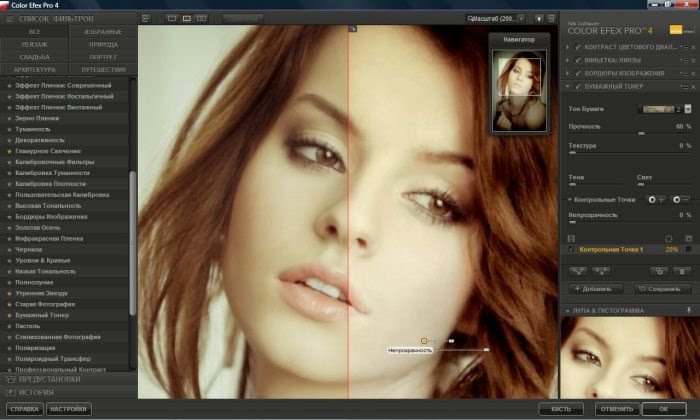
Color Efex Pro 4 32 64 Bit Complete Full Edition
Color Efex Pro 4 32 64 Bit Complete Full Edition
 |
| Color Efex Pro 4 |
PRODUCT HIGHLIGHTS
- 55 Powerful Filters
- Visual Presets
- Combine & Adjust Multiple Filters
- Traditional and Stylizing Filters
- Streamlined Interface
- U Point Technology
- Powerful Selective Tool
- Plug-In for Adobe Photoshop Programs
- Plug-In for Apple Aperture
- Mac & Windows Compatibility
- Istaller Color Efex Pro
- Medicine 32+64
Go to link Download
Wednesday, March 1, 2017
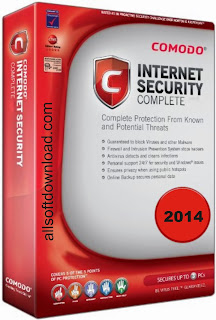
Comodo Internet Security 2014
Comodo Internet Security 2014
 |
| Comodo Internet Security 2014 |
Comodo Internet Security 2014
- Safeguards your personal files towards thieves
- Gives total end-point stability regarding Pcs as well as Cpa networks.
- Computer System Mag Onlines Editors Choice
- Obtains towards central as well as additional violence
- Blocks internet access for you to harmful Trojan viruses plans
Comodo Internet Security 2014 Download link
Go to link Download
CARA Tambah Modal Deposit di Forex
CARA Tambah Modal Deposit di Forex
Cara tambah modal di master forex adalah dengan menggunakan Liberty Reserve atau bisa dengan metode yang lain seperti web money ,wire transfer dll.Kita pilih Liberty Reserve dengan alasan kecepatan, kemudahan, serta effisiensi biaya. Inilah Metoda Teraman, Tercepat, Termurah, serta Termudah untuk Deposit dan Withdrawal di masterforex sebelumnya buka dahulu account libertyReserve. Kenapa kita harus
membuka account liberty reserve? Karena dalam setiap aktifitas e-bisnis, kita pasti membutuhkan suatu alat pembayaran digital dalam bertransaksi. Alat pembayaran digital ini disebut sebagai eCurrency yaitu alat pembayaran yang sah dan diterima secara umum di seluruh dunia, misalnya Credit Card. Namun pemakaian credit card melalui media internet masih banyak memunculkan masalah terutama tingkat keamanannya, apalagi Indonesia sekarang sudah dalam kondisi terblacklist oleh sebagian besar merchant-merchant internasional karena tingginya angka carding atau penyalah gunaannya di Indonesia.
Sebagai alternatif untuk melakukan transaksi secara online Internet kita dapat mempergunakan Liberty Reserve atau lebih populer di sebut LR. LibertyReserve adalah salah satu e-Currency (mata uang digital) yang digunakan sebagai alat pembayaran di internet. Dan seperti eCurrency lainnya LR juga dibackup dengan mata uang tertentu, dalam hal ini LR menggunakan Dollar atau Euro. Kantor Pusat LibertyReserve berkedudukan di CostaRica – negara kepulauan yang bebas pajak atau berpajak rendah (off-shore).
Berikut beberapa keunggulan LibertyReserve: Biaya minimum adalah 1% dari jumlah transfer, maksimumnya $0.99 per tranfer berapapun jumlah uang yang di transfer, proses Instant (langsung masuk saat itu juga), sudah banyak exchanger LibertyReserve di Indonesia sehingga sangat mudah untuk proses jual belinya, serta keamanan pasti terjamin. Bandingkan dengan Wire Transfer (transfer antar rekening bank) yang prosesnya membutuhkan 2-7 hari kerja dan biaya yang mahal sekitar 14 USD sampai 40 USD! Ayo buat account Liberty Reserve Anda sekarang juga! GRATIS dan langsung dapat BONUS $0.05.
Untuk bisa mentransfer uang anda ke Master Forex melalui LibertyReserve, pertama-tama anda harus mempunyai rekening LibertyReserve. Silakan kunjungi www.LibertyReserve.com untuk membuat account LibertyReserve baru milik Anda, membuat rekening LibertyReserve adalah gratis dan tidak memerlukan setoran awal.
Untuk mengisi rekening LibertyReserve, anda bisa membeli di exchanger-exchanger yang terpercaya, anda bisa mencari exchanger terpercaya di artikel Memilih Exchanger yang Aman dan Nyaman Klik di sini . Setelah anda mempunyai dana di LibertyReserve anda bisa mentransfernya ke Master Forex.
Beli atau Jual Liberty Reserve yang populer dapat di cek melalui situs Penukaran Uang Elektronik yang populer misalnya : tukarduid.com , bagi yang sudah lama berkecimpung di bisnis online biasanya pernah berhubungan paling tidak mendengar situs ini
Ada kalanya deposit dari halaman Master Forex mengalami kegagalan, maka solusinya Anda bisa transfer manual dari dalam Account LibertyReserve anda. Caranya silakan login ke account LibertyReserve Anda, setelah anda berada di dalam account LibertyReserve, pilih menu Transfer, isikan amount dengan jumlah uang yang akan dikirim, untuk memo silakan isikan username anda di Master Forex, misal username fulus93, maka isikan di memo fulus93, setelah proses transfer selesai berikanlah nomor batch ke team support agar deposit bisa segera diproses.
Beberapa menit kemudian nomor batch atau nomor transaksi anda akan diperiksa oleh team support Master Forex. Anda akan diberitahu bahwa deposit sudah masuk dan berada di Default Desk, untuk bisa ditradingkan di forex, anda perlu pindahkan dana tersebut dari Default Desk ke Live Forex Desk.
Untuk Anda yang baru belajar forex dan masih pemula, setelah memahami fungsi fungsi tombol Master Forex dan telah sedikit lancar belajar valas dengan uang virtual, saya sarankan segera melakukan deposit dan belajar forex dengan uang sungguhan. Karena ada perbedaan antara belajar valas menggunakan uang virtual dengan belajar forex menggunakan uang yang sesungguhnya, terutama di mental. Anda bisa rasakan sendiri perbedaannya pada saat mencoba bertransaksi dengan uang sunggguhan .
VIDEO MENAMBAH MODAL/DEPOSIT DI MASTERFOREX
A. MENAMBAH DANA
Untuk mengisi dana atau deposit account di master forex silahkan ikuti Langkah-langkah seperti di bawah ini:


Langkah 4
Setelah Anda klik pengisian dana silahkan klik tulisan membayar seperti gambar di bawah ini.

Setelah itu silahkan Anda klik login di Liberty reserve Anda. seperti gambar di bawah ini.


Silahkan klik menarik dana seperti gambar di bawah ini.


KLIK GAMBAR DIBAWAH UNTUK DAFTAR FOREX TRADING

Go to link Download