Showing posts with label cfw. Show all posts
Showing posts with label cfw. Show all posts
Wednesday, March 22, 2017
CFW EquiLibriuM by Team DroiD based on N97v30 5800 5233 5230 5530 X6 All RMs
CFW EquiLibriuM by Team DroiD based on N97v30 5800 5233 5230 5530 X6 All RMs
EQUILBRIUM


CFW Name: EquiLibriuM
CFW Creator: Droidz Xtreme.Infinity & shashwat
Model : Nokia 5800, 5233, 5230, 5530, X6
Supported RMs : All RM supported
Base Firmware : N97v30.0.004
Release Date : 10-January-2012
Languages Present : English
MESSAGING:
- Messages sent by you will be saved up to 500 messages
- Delivery reports ON by default
- Messaging application no longer lags when containing large number of messages
- 4x11 Qwerty + Alphanumeric keypad added with Auto rotate QWERTY
- Default memory assigned to C:/ for better performance
- N8 Emotions Support(Smiley)
- 6 page custom symbols support
MENU:
- Glossy Anna Icon Pack
- All Lags in Menu removed
- Optimized to run very fast and smooth (Tweaked Kinetic Scrolling in Menu)
- 6x2 N8 landscape grid layout for Menu
MULTIMEDIA:
- Camera will not leave in background after exit (SAVES RAM)
- Voice recorder set to High quality
- Voice recorder records upto 14 hours
- Voice Recorder will save the file in E:
- Camera Image Quality improved
- Camera already in use bug solved completely
- Gallery searching improved
- OVI Music removed from Music Homescreen
- Video Capture predefined frame rate increased to 25fps
- Music Player will read E:Music
- Music player will refresh faster
- One touch N8 Equalizer
- Sound quality optimised to smooth and better quality experience
FILE MANAGER:
Nokia default file browser can send sisx, sis, jar and any protected items via bluetooth, mms and uploads
BROWSER:
- New and Improved Belle UI Web Browser
- Supports HTML5
- Download manager will be started on browser start-up to resume
- Browser will prompt to continue download if connection breaks due to power failure
- Browser Cache set to C:
- Default Homepage set to http://www.ovi.com
- Auto form data save activated
INSTALLATION FEATURES:
- Java permission is set to default
- PNHT installserver patch added (Now install any unsigned apps).
- Secure Widget Preinstall (OVI Store Installer) will not run on first startup but will install at one click from menu icon
LIGHTS BEHAVIOUR:
- All lights bugs fixed! (thanks again to die2mrw007)
- Green Charging light disabled.
- Breathing light OFF by default
- Tap to unlock support
- All lights off when charging in Switched OFF state
- Lock/Unlock vibration removed
GRAPHICAL PERSONALISATIONS:
- EquiLibriuM customized SplashScreen and ShutdownScreen.
- Bootscreen Volume set to : 07
- Custom Boot/Shutdown animation locations -
- E:BootStartup.gif Startup.mp3
HOMESCREEN:
- Widgetized Nokia Homescreen
- Full widgets support
- 5 Additional shortcuts bar. Total : 6
- Swipe to clean HS (clock widget removable)
- Original Belle dialer icon
- "0" activates KillMe app instead of Web Browser
Camera:
- Increased fps to get better quality shots
- camera completely fixed!
- "camera already in use" bug fixed
- Touch UI capture button working
General Modifications :
- "Restart" Option instead of "Lock Screen and Keys" in Power Menu by CODeRUS.
- Glossy Anna Icon Pack is used. (With 0 bugs) Now icons change according to the theme applied.
- Tap to Unlock added
- Camera will not eat RAM after closing it.
- Default bluetooth name: Nokia EquiLibriuM
- FOTA reserved space removed to get more space in C: (Phone Memory)
- Voice recording during call fixed. Your phone wont crash if you record and call someone at the same time.
- RAM Cache in C: for better performance
- Blazing Fast Screen Rotation
- CPU load decreased (Get a very fast phone)
- Disabled My Nokia Service. It will prevent phone to send premium message to 5555 (Nokia) after first boot.
- Zero start up of background applications
- Auto optimization of RAM cache for keeping up your phone faster even after heavy usage
- Blank UDA supplied to get highest possible free space on C: (rename the supplied uda.fspx file according to the original uda.fspx)
- Lags in Menu removed. The Kinetic Scrolling is optimized. Experience the fast and smooth touch feel.
- Display rotation is ON by default
- Breathing light is OFF by default
- Digital clock set as default. N8 Clock fonts used so the digital clock now looks like the N8 clock
- Calibri Fonts with symbol support added (Belle Modded)
- Operator Logo ON/OFF settings available in homescreen settings (depends though)
- Delivery Reports ON by default in Messaging
- Theme effects are OFF by default
- Removed "Check for Updates" in Device Updates
- "speed dialing" ON by default
- "In call timer" ON by default
- Profile "General" renamed to "EquiLirbiuM"
- Homescreen landscape enabled. Dialer landscape disabled.
- Tap to unlock respect sensor orientation.
- Changed the default widgets layout. Nokia Notifications with symbian anna icons widget comes preinstalled.
- Now Music Player will not return you to Menu after exiting it.
- Gallery loads faster
- Brightness mod added
- Latest Ovi Store Provided
Performance Upgrades:
- Highly Optimized Application/Gaming frame rates
- Increased Response Rate (Now touchscreen will be more responsive)
- CPU frames render was increased.This will result in a smooth phone experience.
- Graphical Complexity reduced. Performance Booster without any side effects.
- Music Player response highly increased (Instantly pauses/plays on clicking the buttons)
- Increased Heap Size further to boost up performance
- Lags in Menu, messaging and Other Large Applications removed
- Polished the UI for heavy usage
- Phone will never slow down and the RAM wont be decreasing (RAM Caching modded)
- Smooth Kinetic Scrolling
- Music Player is now a lot more faster!
- CPU mod optimized to get complete stability and a great battery life!
Ovi Maps 3.06 beta11 added with no QT conflict issues. Special thanks to debsin
REMOVED APPS :
All Default Themes, Chat, Podcasting, Image Print, OVI Contacts, OVI Music, Here and Now, Online Support, Phone Switch, My Nokia, Quick Office, Adobe Reader, Help.
Applications Added in Rofs: BTSwitch 1.0, Rom Patcher 3.1, KillME 1.36, AutoInstaller , Nokia File Browser.
Run AutoInstaller if you need: Best Screensnap , Brightlight.
Some Wallpapers are provided in Folder E:EquiLibriuM
INSTRUCTIONS
If you dislike the Boot Animation effects and sound, U can disable it by deleting folder named "Boot" in E:/
Please Note:
- Before Flashing please delete folders Private, Data, Resource, cities, Sys, System and any other folders from Memory Card which are not used by you.
- After successful flashing, wait for sometime till all the widgets gets loaded to the Homescreen.
- Vibration in call is disabled by default. Though after first boot it will not take effect. Hence you are required to change the profile to any other and revert back to EquiLibriuM Profile. This will just solve the issue
- Using the provided uda file with Core link is highly recommended. Failing which you may counter bugs.
DOWNLOAD
Nokia 5800
CORE (v52.0.101): Click Here
Core (v52.0.007): Click Here
Core (v60.0.003): Click Here
EquiLibriuM ROFS+uda :EquiLibriuM for 5800 RM-356
(Rename the rofs file according to the Core version you use)
Nokia 5230
Core (v51.0.002): Click Here
Core (v51.6.002): Click Here
EquiLibriuM ROFS+uda :EquiLibriuM for 5230 RM-588
Core files version 50.0.001 or higher can be used with this rofs
(Rename the rofs file according to the Core version you use)
Nokia 5233
CORE (V50.1.001): Click Here
Core (V50.9.001): Click Here
Core (V51.1.002): Click Here
EquiLibriuM ROFS+uda :EquiLibriuM for Nokia 5233 RM-625
Core files of v50.1.001 or higher can be used with this rofs
(Rename the rofs file according to the Core version you use)
Nokia X6
CORE (v32): Click Here
CORE (v40): Click Here
EquiLibriuM ROFS+uda : EquiLibriuM for RM-559 X6
Nokia 5530
Core (v32): Click Here
Core (v40): Click Here
EquiLibriuM ROFS+uda :EquiLibriuM for 5530 RM-504
CREDITS: shashwat (gizmolord moderator), PNHT Team.
Please visit and register to this forum : http://forum.gizmolord.com/
Shared from : http://forum.gizmolord.com/index.php?topic=1780.0
Nb : Tidak menjawab pertanyaan buat yang baru mau mencoba melakukan Flashing. Do it by your own risk!
Go to link Download

Sunday, February 12, 2017
Cara Menghapus Bahasa Pada Proses CFW Custom Firmware di Ponsel Nokia
Cara Menghapus Bahasa Pada Proses CFW Custom Firmware di Ponsel Nokia
Ini berdasarkan pengalaman saya yang telah lalu ketika ingin melakukan CFW (custom firmware) pada Nokia 5800xm milik saya sendiri dan gagal. Perlu kamu ketahui dalam mengedit file rofs2 dan rofs3, itu ada ketentuannya, yaitu :
- file rofs2 ukurannya tidak boleh lebih dari 33mbyte.
- sedangkan file rofs3 tidak boleh lebih dari 13mbyte.
Untuk mengantisipasi oversize, khususnya dalam hal ini adalah untuk file rofs2, kamu sangat disarankan untuk terlebih dahulu menghapus bahasa yang menurut kamu tidak perlu dipasang. Ingat, jika terjadi oversize, maka ponsel kalian bisa jadi gagal software dan mati.
Untuk pengguna firmware APAC1 RM-356 Indonesia, ada empat bahasa dengan kodenya masing-masing yang sudah terpasang, yaitu :
- 159 (english)
- 31 (chinese PRC)
- 326 (malay Asia-Pasific) ; dan
- 327 (bahasa).
Saya beri dua cara menghapus language di rofs2 :
- Cara manual (supaya kita mengetahui letak file-file language berada).
- Dengan GUI rofs2 language remover.
MANUAL
Jika kamu sudah meng-ekstrak file rofs2, mari saja kita langsung masuk ke langkah pertama, menghapus bahasa. Pada artikel ini, saya mempraktekkannya dengan menghapus tiga bahasa sekaligus (chinese, malay dan bahasa indonesia). Yang saya pakai cukup english saja. Terserah kamu ingin menyisakan bahasa yang mana. Yang terpenting, kamu berpatokan pada kode-kode bahasa tersebut.
English, dengan kode bahasa 159 didalam rofs2, filenya ber-ekstensi .r159. Jadi bisa kita simpulkan untuk bahasa-bahasa yang lain, ekstensi filenya akan berbeda-beda. Misalnya :
- .r31 untuk chinese
- .r326 untuk malaysia
- .r327 untuk bahasa indonesia

klik gambar untuk zoom
Pada gambar diatas adalah letak file .r*** (bahasa) berada. Secara spesifik, letak semua file berekstensi .r*** itu berada pada :
- rofs2/resource
- rofs2/resource/aplicationhelp, hapus folder yang bernama sama dengan kode bahasa negara yang tidak kamu kehendaki.
rofs2/resource/aplicationhelp

- rofs2/apps.
- rofs2/apps/activesearch.
- rofs2/resource/cntmodel.
- rofs2/resource/fep.
- rofs2/resource/messaging.
- rofs2/resource/messaging/bif.
- rofs2/resource/messaging/mtm.
- rofs2/resource/multitap, jangan hapus PtiEnglish.rsc.
- rofs2/resource/plugins.
- rofs2/resource/qwerty, jangan hapus English.rsc.
- rofs2/resource/TimeZoneLocalization
- rofs2/resource/uiklaf, sisakan file EikPriv.rsc.
rofs2/resource/uiklaf

- rofs2/resource/xhtml, hapus semua folder yang bernama sama dengan kode bahasa yang tidak kamu kehendaki.
rofs2/resource/xhtml

- rofs2/private/101F4CD2/content, hapus semua folder yang bernama sama dengan kode bahasa yang tidak kamu kehendaki, dan jangan kamu hapus file appshelldata.xml di dalam folder tersebut.
rofs2/private/101F4CD2/content

- rofs2/private/10207254/themes/.../1.0, ini adalah folder homescreen. Di situ terdapat file yang berakhiran o00xx. xx itu berarti kode negara. Hapus filenya yang berakhiran kode negara yang tidak kamu kehendaki. Tapi jangan hapus file dengan kode english (159).
private/10207254/themes/.../1.0

- rofs2/sys/bin, hapus file .dll yang nama depannya T9, dan dengan nama bahasa yang tidak kamu kehendaki. Jangan hapus T9English.dll.
rofs2/sys/bin

Jika semua file yang berbau bahasa (yang berakhiran .r*** atau nama bahasa) sudah kamu hapus, maka bahasa yang tidak kamu perlukan akan hilang dari ponsel. Ingat ya, jangan dihapus semua. Sisakan semua file yang berekstensi .r*** (kode negara) yang kamu inginkan.
Saya mau tambah satu cara yang paling cepat menghapus file-file bahasa yang tidak kamu inginkan, namun begitu banyak bukan? Cara saya adalah, dengan menggunakan fitur pencarian pada PC (ctrl+F).
Misalnya saya ingin menghapus bahasa cina dengan kode negara 31. Di kotak pencarian pada folder rofs2, saya ketik .r31. Maka pencarian akan menghasilkan (result) semua file yang tertulis .r31. Semua file tersebut saya blok dan delete. Mudah bukan :)
cara mudah dengan ctrl + f

Tapi ingat, jangan lupakan folder-folder di rofs2 yang bernama sama dengan kode-kode negara yang tidak kamu kehendaki, itu juga harus dihapus.
Jika kamu sudah yakin semua bahasa yang tidak diperlukan sudah terhapus, sekarang kamu menuju ke direktori : rofs2/resource/Bootdata. Di situ terdapat file languages.txt, dan harus kamu edit. Cara mengeditnya mudah, hapus semua kode negara yang tidak kamu perlukan.
edit file languages.txt

DENGAN GUI ROFS2 LANGUAGE REMOVER
- Download GUI rofs2 language remover disini.
- Buka software GUI.
- Pilih folder rofs2.
- GUI akan mendeteksi bahasa apa saja yang ada di rofs2, kemudian hapus satu-persatu.
- Sisakan bahasa yang kamu kehendaki sebagai bahasa default.
- Tutup GUI rofs2 language remover.
- Selesai.
GUI Language rofs2 Tool v 1.4

rofs2 sebelum dan sesudah dihapus bahasa

Jika semua bahasa yang tidak kamu perlukan sudah terhapus, maka kamu sudah memberi ruang lebih sampai 6mbyte. Ukuran space yang sangat lumayan untuk kamu isi banyak mod di rofs2 :)
Semoga bermanfaat.
Go to link Download
Monday, January 30, 2017
CFW Nokia 5230 and 5233 BELLE BETA Beta Released For More Suggestions
CFW Nokia 5230 and 5233 BELLE BETA Beta Released For More Suggestions
NOKIA 5230 AND 5233 | BELLE BETA


WARNING!! FOR PROFESSIONAL AND ADVANCED USERS ONLY!
Exclusive mods added :
- belle top bar 2.1 beta
- Deskclock (run auto at start)
- no scroll bar true mod (without grid_switch app.)
- belle navibar
- ofw dialer
- qt in Z drive
- mRuntime in Z drive
- changefx in Z drive
- more changelog coming
BETA VERSION FOR Nokia 5233 RM-625 download here
CFW ini belum di test oleh saya sendiri, silahkan dicoba dan di feedback untuk teman-teman yang lain.
More Screenshots :
Screenshots:


Shared from : http://forum.dailymobile.se/
Thanks to mr.wonderfu1 dailymobile forum member
DO IT BY YOUR OWN RISK!!
Go to link Download
Friday, September 30, 2016
CFW V40 Dengan Label Produk Versi V50 0 005 Nokia 5800xm Modifikasi Software Optimal Hack Permanent Dengan Flashing JAF
CFW V40 Dengan Label Produk Versi V50 0 005 Nokia 5800xm Modifikasi Software Optimal Hack Permanent Dengan Flashing JAF
Cara ini saya praktekkan dengan menggunakan ponsel saya sendiri, Nokia 5800 XpressMusic. Firmware version 5800 saya sebelumnya adalah V 31.0.010 hacked, ke CFW (Custom Firmware) V40 dengan label product V50.0.005 hacked, dengan modifikasi software (change log) untuk meningkatkan performa ponsel.
PERINGATAN!!
HANYA UNTUK NOKIA 5800XM V 40.0.005 KE BAWAH
CARA INI DAPAT MERUSAK PERANGKAT ANDA SENDIRI
HARAP SEMUA DIJALANKAN SESUAI PETUNJUK ..
1. Perangkat yang kamu butuhkan :
- Ponsel 5800xm (pastikan baterai dalam kondisi full)
- Kabel data
- PC / Laptop
- MMC (sudah di format terlebih dahulu dan backup semua data penting)
- RM-356_40.0.005_prd.core.C00
- RM-356_40.0.005_prd.rofs2.V19
- RM-356_40.0.005_C01_prd.rofs3.fpsx
- RM356_40.0.005_023_xxx_U01.uda.fpsx
- RM356_0591826_40.0.005_001.dcp
- RM356_0591826_40.0.005_001_signature.bin
- RM356_0591826_40.0.005_001.vpl
Portal download navifirm Nokia

Download file-file firmware nokia 5800

Pada gambar diatas bisa kamu lihat, kamu hanya perlu mendownload 5 file. Kelima file bisa kamu dapatkan di sini.
Sedangkan untuk file rofs2 dan rofs3 dari portal tersebut tidak membuat ponsel termodifikasi dan tidak membuat hack pula. Untuk mendapatkan file :
- RM-356_40.0.005_prd.rofs2.V19 mod di sini
- RM-356_40.0.005_C01_prd.rofs3.fpsx mod di sini
Proses flashing hanya bisa memuat file firmware jika file-file tersebut kamu posisikan secara tepat pada direktori yang semestinya. Beikut adalah caranya :
- Menuju ke direktori C:Program FilesNokiaPhoenixProductsRM-356. Jika belum ada, segera kamu buat dengan cara manual. Ingat, ejaan untuk masing-masing nama folder tidak boleh kurang/lebih satu huruf pun! Karena proses flashing hanya bisa memuat file firmware di direktori tersebut.
- Copy ketujuh file firmware ke direktori C:Program FilesNokiaPhoenixProductsRM-356
- Ekstrak file rofs2, dan copy semua foldernya ke dalam satu folder yang kamu beri nama RM356_0591829_40.0.005_001. Proses ekstrak file rofs2 bisa kamu lakukan dengan Nokia Editor. Download Nokia Editor.
- Ekstrak folder zip Nokia Editor dan buka file NokiaEditor.exe.
Nokia Editor (PNHT)

Ekstrak file

Posisi file dan folder yg tepat

isi dari folder RM356_0591829_40.0.005_001

Jika semua folder dan file sudah di posisikan secara tepat,kini kamu siap melakukan flashing dengan JAF.
4. Proses Flashing
Sekarang kamu download perangkat JAF 1.98.62. Cara pengoperasiannya :
- Buka file zip JAF, disitu terdapat dua file : JAFSetup_1.98.62.exe dan OGM_JAF_PKEY_Emulator_v 5.exe.
- Buka file JAFSetup_1.98.62.exe dan lakukan proses instalnya.
- Selesai di instal, jangan langsung buka software JAF-nya, yang harus kamu lakukan selanjutnya adalah buka file OGM_JAF_PKEY_Emulator_v 5.exe sebagai emulator.

- Beri tanda pada opsi yang disediakan sesuai gambar diatas, dan klik GO.
- Tidak lama kemudian akan muncul peringatan : Error : BOX DRIVER NOT INSTALLED!!
- Klik yes saja, dan JAF akan muncul.
- Setting JAF dengan benar.
Setting JAF

- Pilih tab BB5 tepat diatasnya, dan setting seperti pada gambar diatas.
- Muat file firmware yang sudah kamu download pada masing-masing tempatnya.
Memuat file firmware pada JAF

Pengaturan memuat file firmware

- Pastikan semua file firmware termuat sesuai aturan.
- Switch off ponsel 5800xm
- Hubungkan ke PC / laptop dengan kabel data.
- Klik tombol Flash di JAF.
- Peringatan dari JAF akan muncul bersifat WARNING! kamu jangan panik, tekan yes saja.

- Setelah tidak lama menekan yes pada peringatan yang baru muncul, maka pada JAF akan muncul perintah berikutnya, seperti gambar diatas.
- Tekan tombol power pada ponsel selama kurang lebih 1-2 detik.
- Lepas tombol power jika JAF sudah men-detect ponsel kamu, dan flashing dimulai.
Jika JAF gagal men-detect ponsel, itu artinya waktu kamu menekan tombol power kurang tepat. Yang harus kamu lakukan adalah tekan kembali tombol Flash di JAF, dan sesiap mungkin kamu menekan kembali tombol power ponsel pada saat perintah dari JAF muncul. Jika JAF masih belum men-detect, ulangi lagi sampai timing-nya tepat.
Jika proses Flashing sudah selesai, akan muncul teks done! pada JAF. Pada saat itu, lepas kabel data dari ponselmu.
Proses flashing selesai
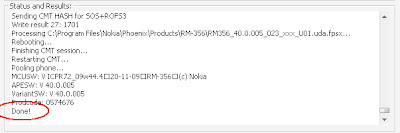
Ponsel akan restart dengan sendirinya dan muncul dengan versi baru yang sangat memukau!!
Pengoperasian Nokia 5800xm kamu akan lebih cepat, dengan beberapa aplikasi sudah tertanam di dalamnya. Pilihan Home Screen tambahan yang makin memudahkan pengoperasian.Untuk lebih menyempurnakan sistem pengoperasiannya yang baru, alangkah baiknya ponsel kamu jangan langsung di utak-atik. Biarkan software barunya beradaptasi dengan hardware.
Saya baru melakukan Flashing ini kemarin (18 April 10), dan berikut perubahan-perubahan performa pada Nokia 5800xm CFW V 50.0 :
Note :
Change Log 5800xm CFW V40.0
- Hasil flashing, untuk music player hanya membaca file mp3 di E:Music. Jadi kamu harus posisikan semua file mp3 di direktori tersebut pada MMC.
- Tidak ada pilihan mode full qwerty keyboard. Tapi jika ponsel di putar, secara otomatis akan berubah ke mode pengetikan full qwerty keyboard.
- X-plore error saat pertama dibuka, jangan khawatir. Tutup kembali Xplore dengan taskman, dan segera buka kembali Xplore. Masalah tidak ada lagi.
- Jangan menekan lama tombol switch off. Karena akan me-reboot ponsel, Untuk me-non aktifkan ponsel, cukup pilih opsi switch off. Patch untuk tombol switch off aktif.
- System error! Tidak perlu panik. Sebaiknya untuk patch c2z jangan kamu sett add to auto, itu adalah salah satu penyebabnya. Atau jika sudah terlanjur, kamu buka RP+ (RomPatcher) dan disable semua patch. Kemudian tutup RP+. Buka menu, kemudian buka RP+, dan apply kembali semua patch. Buka RP+ dengan Handy Taskman.
Tampilan baru setelah flashing
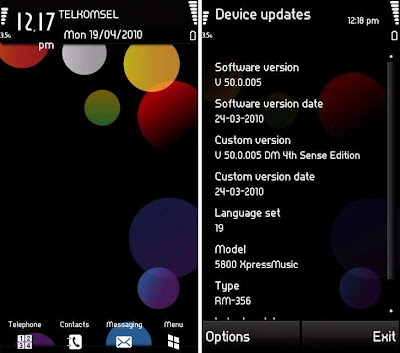
Selamat mencoba dan semoga berhasil!!
Best thanks to :
Symbianzone and Tube Lounge on Kaskus.
Go to link Download
Subscribe to:
Posts (Atom)