Showing posts with label software. Show all posts
Showing posts with label software. Show all posts
Friday, May 12, 2017
City Hotel Management Software
City Hotel Management Software
All-In-One City Hotel Management Software Philippines
Promo Price is for Reservations Module Lite Version ONLY. Inquire for Ai1 Lite, Deluxe, Premier package pricing.
Attention All City Hotel Owners and Operators: In today’s digital economy, how can you risk decisions made on weeks to months-old information?
Introducing Ai1, the world’s first all-in-one City Hotel software which also covers all aspects of Revenue, Inventory, Labor, and Accounting no other software needed. Ai1 is specifically engineered to give you key intel on your City Hotel property faster than ever before, including the fastest-ever financial statements, inventory and management reports—on-demand or within 24 hours.
24/7 Local Support. Terms and Conditions apply.
Ai1 also covers the crucial business functions common to all businesses, including:
1. Transaction and Revenue Management.
2. Materials and Asset Management
Warehousing Inventory Control.
Asset Management.
3. Human Resources Management
Localized payroll.
Human Resources Information System.
Timekeeping.
4. Accounting.
GAAP/IFRS Compliant
Seamless integration with all other modules.
No redundant entry.
Now for the first time ever enjoy on-demand management reports right to your mobile phone. Anywhere in the world! Ai1. All-In-One. By Gatessoft Corp. Call now for a free, no-obligation demo.
CONTACT US NOW: 02-501-5846
02-869-7766
02-833-3995
inquiry@gatessoftcorp.com
*Indicated price is not the actual price. Costs may vary depending on the transaction made and product purchased.
from Classified Ads City Hotel Management Software
Go to link Download

Monday, May 1, 2017
Cara menyisipkan virus di komputer teman dengan software
Cara menyisipkan virus di komputer teman dengan software
Cara menyisipkan virus di komputer teman dengan software - Selamat malam sobat semua... !!!!
dari pada kamu bengong dan harus ngapain mendingan kamu coba - coba yang ini pasti seru dan buat mainan baru, ya bagi yang suka jail sie, tapi sebaiknya jika ini berhasil di pergunakan untuk kebaikan aja deh. karna berabe urusannya kalo sampe tuk ngerjain teman kamu sendiri. hehehe

Menyisipkan virus dengan software di komputer clien - cara kerja software ini cukup simple, karna anda hanya membutuhkan beberapa software aja, nah yg agx rumit si nginstalnya.
Sekedar penjelasan aja virus apa sie yang akan kita mainkan, trojan ya prorat trojan, virus yang ini sudah sangat pameliar sekali, karna virus ini selalu mengusik data - data yang kita punya. sebelum menggunakannya apa sie trojan itu, seperti penjelasan di bawah ini anda akan mengerti nantinya
Trojan Horse atau yang biasa dikenal dengan “Trojan” merupakan bagian dari infeksi digital yang kehadirannya tidak diharapkan oleh pemilik komputer. Trojan terdiri dari fungsi-fungsi yang tidak diketahui tujuannya, tetapi secara garis besar mempunyai sifat merusak. Trojan masuk ke suatu komputer melalui jaringan dengan cara disisipkan dengan cara langsung ataupun tidak langsung.
Trojan tidak membawa pengaruh secara langsung seperti halnya virus komputer, tetapi potensi bahayanya dapat jauh lebih besar dari virus komputer. Trojan dapat diaktifkan dan dikendalikan secara jarak jauh atau menggunakan timer. Pengendalian jarak jauh seperti halnya Remote Administration Tools, yaitu versi server akan dikendalikan oleh penyerang lewat versi client-nya. Banyak hal yang dapat dilakukan oleh penyerang jika komputer korban yang telah dikendalikan. Ada banyak sekali jenis Trojan, namun kali ini kami akan membahas Prorat (Trojan dari Turki).
Banyak sekali yang bisa anda lakukan dengan Prorat, mulai dari sekedar hal-hal ‘iseng’ hingga tindakan yang bisa membuat korban mengeluarkan keringat panas dingin. Nggak percaya? Langsung saja dibuktikan. Berikut ini cara menggunakan Prorat :

- Sekarang, silahkan Download dan ekstrak Prorat pada link di bawah kemudian jalankan Prorat dari komputer anda.


- Berikut inilah tampilan Trojan Prorat. Pertama-tama, anda harus membuat sendiri trojan server yang nantinya akan dikirimkan dan dijalankan di komputer target. Anda diharuskan untuk membuat terlebih dahulu file trojan server. Untuk membuat trojan server, silahkan anda klik tombol Create kemudian klik Create Prorat Server (342 Kbyt).

- Maka akan muncul jendela Create Server seperti pada gambar berikut ini. Bagian pertama yang harus anda atur adalah bagian Notifications.
- Pada kotak IP (DNS) Address, silahkan masukkan alamat IP komputer anda. Sedangkan bagian lainnya boleh anda biarkan saja.

- Selanjutnya, klik General Setting. Server Port biarkan saja menggunakan default 5110. Kemudian buatlah Password Server dan Victim Name yang anda inginkan.

- Jika sudah, sekarang klik Bind With File. Pada bagian ini anda disuruh untuk menyisipkan file ke dalam trojan server. Berikan saja tanda ceklis pada Find server with a file kemudian klik Select File.

- Adapun ekstensi file yang bisa anda sisipkan terserah. Sebagai contoh saya menggunakan gambar ‘Koala.jpg’.

- Jika muncul kotak dialog peringatan, klik saja OK.
- Sekarang klik Server Extension. Silahkan pilih bentuk ekstensi trojan server yang anda inginkan. Penulis memilih menggunakan EXE.

- Pada bagian Server Icon, pilihlah icon sesuai keinginan yang telah disediakan. Sebagai contoh, penulis memilih menggunakan icon video.
- Oh ya, usahakan anda menggunakan bentuk icon yang menarik untuk di klik misalnya video, game, mp3, dan lainnya. Agar korban nantinya tertarik untuk membuka file tersebut.

- Selesai!! Untuk melihat file Trojan Server yang baru saja anda buat biasanya ada di dalam folder Trojan.
- Berikut inilah tampilan file Trojan Server yang baru saja dibuat menggunakan ikon video dan agar lebih menarik perhatian, maka penulis me-rename file tersebut dengan nama “Maria Ozawa Uncensored”. Tujuannya sih sederhana, agar siapapun yang melihat file ini nantinya jadi ‘kepengen’ untuk membukanya hehehehe

OK!! Tugas anda selanjutnya adalah menyebar file Trojan Server dan menginfeksikannya di komputer korban. Terserah anda menggunakan cara apa. Bisa saja anda menyisipkan pada lampiran email dan menunggu korban menjalankannya, atau bisa dengan cara halus berkata ‘Tolong mas ya jalankan file ini’ atau bahkan mengancamnya dengan berkata ‘Heiii….jalankan file ini kalau tidak, kamu akan aku Bunuh’. Anggap saja file telah berhasil terinfeksi di komputer korban. Nah, sekarang anda tinggal menjalankan Prorat di komputer anda sendiri dan selamat bermain.
Perlu anda ketahui bahwa Prorat lebih jahat dan lebih ganas daripada trojan lainnya. Ada banyak sekali yang bisa anda lakukan dengan Prorat mulai dari sekedar menjahili korban hingga membuat korban stress seperti melakukan format seluruh isi Hard Disknya
Cara penggunaannya cukup mudah, anda tinggal memasukkan alamat IP korban kemudian klik Connect untuk memulai.
Sangat banyak sekali yang bisa anda lakukan dengan Prorat seperti melihat informasi PC korban (PC Info), Mengirimkan pesan ke komputer korban (Message), Chating dengan korban (Chat), Sekedar mempermainkan korban seperti menghilangkan taskbar dan membalik layar monitornya (Funny Stuff), Mengacak-acak Control Panel (Control Panel), dan berbagai kegiatan menyenangkan lainnya. Sebagai contoh, untuk mengirimkan pesan ke layar monitor korban adalah dengan klik menu Message kemudian isi pesan anda pada kotak Message Box Text dan klik Send.

Berikut ini tampilan isi menu Funny Stuff dan untuk menormalkan kembali klik Show atau Fix it.

Anda juga dapat mencuri data secara diam-diam dari komputer korban. Caranya klik menu File Manager dan klik Refresh. Pilihlah drive komputer korban dan silahkan anda ambil filenya dengan cara klik tombol Download.

Jika anda tidak menemukan data yang anda cari, maka anda dapat menggunakan fasilitas Search Files. Silahkan anda tentukan drive pada kotak Location dan tentukan juga ekstensi file yang and acari pada kotak Searching For kemudian klik Find.
Jika data sudah ditemukan, klik Download.

Anda juga dapat mengaktifkan keylogger untuk memata-matai dan mencuri password. Klik menu Keylogger dan untuk melihat hasilnya, klik Read Log.

Cukup serukan tutorialnya, tutorial ini ane kutif dari blog yang keren abiss (http://www.javacreativity.com/). dan sekaligus izin share ya smoga anda tidak keberatan.
Smoga software Prorat ini tidak di salah gunakan dan dapat bermanfaat untuk anda dan orang yang anda sayangi terimakasih.
- Download Advanced Scanner
- Download Prorat ( Via 4hared )
Go to link Download
Tuesday, April 18, 2017
China Mobiles Flash Tool Flashing Software WithOut Box Free Download For All
China Mobiles Flash Tool Flashing Software WithOut Box Free Download For All
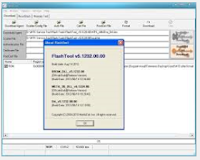 China mobiles flash tool {Flashing Software} application free download for windows PC. China mobiles flash tool software helps you to unlock or flash any china mobile without box. Download china mobiles flasher full setup installer file for windows from the provided link. And after completely downloading install it on your Computer and start flashing china cell phones easily without waiting longer. One click on the below link to start download your needed software now.
Download China Mobiles Flash Tool
Go to link Download
Monday, April 10, 2017
Conference Convention Centre Software
Conference Convention Centre Software
Conference and Convention Centre Hotel Software Philippines
Promo Price is for Reservations Module Lite Version ONLY. Inquire for Ai1 Lite, Deluxe, Premier package pricing.
Attention All Conference and Convention Centre Hotels: In today’s digital economy, how can you risk decisions made on weeks to months-old information?
Introducing Ai1, the world’s first all-in-one Conference and Convention Centre Hotel Software which also covers all aspects of Revenue, Inventory, Labor, and Accounting no other software needed. Ai1 is specifically engineered to give you key intel on your Conference or Convention Centre Hotel faster than ever before, including the fastest-ever financial statements and inventory reports within 24 hours.
24/7 Local Filipino Support. Terms and Conditions apply.
Ai1 also covers the crucial business functions common to all businesses, including:
1. Transaction and Revenue Management.
2. Materials and Asset Management
Warehousing Inventory Control.
Asset Management.
3. Human Resources Management
Localized payroll.
Human Resources Information System.
Timekeeping.
4. Accounting.
GAAP/IFRS Compliant
Seamless integration with all other modules.
No redundant entry.
Now for the first time ever enjoy on-demand management reports right to your mobile phone. Anywhere in the world! Ai1. All-In-One. By Gatessoft Corp. Call now for a free, no-obligation demo.
CONTACT US NOW: 02-501-5846
02-869-7766
02-833-3995
inquiry@gatessoftcorp.com
*Indicated price is not the actual price. Costs may vary depending on the transaction made and product purchased.
from Classified Ads Conference Convention Centre Software
Go to link Download
Sunday, March 19, 2017
Cara Mengubah gambar CR2 ke JPEG menggunakan software CR2 Converter
Cara Mengubah gambar CR2 ke JPEG menggunakan software CR2 Converter
Haloo sobat pembaca, kali ini saya ingin berbagi sedikit tips cara mengubah gambar dengan format CR2 menjadi JPEG menggunakan aplikasi gratis CR2 Converter. Saya menulis tutorial ini berawal dari permintaan seorang teman yang memiliki photo hasil jepret kamera Canon DSLR dengan format CR2. Dia ingin merubah format CR2 tersebut ke dalam bentuk JPEG agar bisa dibuka pada komputer. Setelah mencari literatur disana sini, menurut saya cara ini lah yang terbaik untuk dilakukan karena lebih cepat dan mudah.
CR2 (Canon Raw versi2) merupakan format fotografi RAW digital yang dibuat oleh Canon Inc, salah satu file gambar mentah yang dapat menyimpan semua informasi gambar asli tanpa pengolahan gambar, sehingga merupakan format yang sangat baik untuk semua fotografer profesional atau penggemar fotografi. File RAW perlu mempertahankan semua rincian dan informasi, sehingga ukuran filenya jauh lebih besar dari file gambar JPG / JPEG.
CR2 Converter adalah software konverter gratis untuk gambar dengan format CR2 (Canon RAW versi 2). Dapat digunakan untuk mengkonversi gambar dengan format CR2 atau file gambar CRW ke format gambar yang umum, seperti JPEG / JPG, GIF, BMP, BMP atau format TIFF. Untuk mendownloadnya klik pada link di akhir post ini.
Perangkat lunak ini dapat mendukung konversi batch, sehingga sobat dapat menambahkan beberapa foto digital sekaligus, dan mengkonversinya secara bersama-sama. Tidak ada pengaturan yang terlalu rumit, tidak ada operasi yang kompleks, software ini sangat sederhana dan mudah digunakan.
Jika sobat adalah penggemar Kamer Digital Canon SLR, ini adalah software yang sangat berguna untuk sehari-hari Anda, karena dapat membantu Anda dengan mudah memecahkan pertanyaan seperti "cara convert CR2 ke jpg" atau kebutuhan yang serupa.
Jika sobat adalah penggemar Kamer Digital Canon SLR, ini adalah software yang sangat berguna untuk sehari-hari Anda, karena dapat membantu Anda dengan mudah memecahkan pertanyaan seperti "cara convert CR2 ke jpg" atau kebutuhan yang serupa.
Cara Mengubah gambar CR2 ke JPEG menggunakan software CR2 Converter
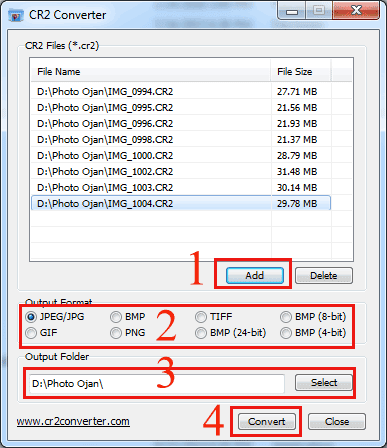
Pertama
Pilih tombol Add untuk memasukkan file photo dengan format CR2, bisa satu persatu atau langsung banyak juga bisa.
Kedua
Tentukan Format output photo yang akan dihasilkan nantinya, dalam contoh ini kita pilih JPEG saja sesuai dengan kebutuhan
Ketiga
Tekan tombol select untuk menentukan lokasi Folder photo hasil convert
Keempat
Tekan Tombol Convert untuk memulai proses convert CR2 ke JPEG. Lama proses convert tergantung dari banyaknya file dan besar kecilnya ukuran gambar yang diconvert.
Demikian tutorial sederhana Cara Mengubah gambar CR2 ke JPEG menggunakan software CR2 Converter, selamat mencoba dan semoga bermanfaat.
Download software CR2 Converter 927 KB
Link Alternative
Download software CR2 Converter 927 KB
Link Alternative
Baca juga Cara Paling Mudah mengubah JPG ke PDF
Go to link Download
Tuesday, February 28, 2017
Cara Mudah Rotasi Video yang Terbalik menggunakan Software VIDEO ROTATOR V 1 0 9
Cara Mudah Rotasi Video yang Terbalik menggunakan Software VIDEO ROTATOR V 1 0 9
VIDEO ROTATOR_V.1.0.9
Include KEY REGISTRATION

Assalamualaikum...wr...wb. Hai Sobat RD yang berbahagia, pernahkah Sobat me-rekam video dari hp terus pas diputar di PC atau Laptop videonya miring atau malah terbalik, pasti sangat menjengkelkan banget kan...??. Nah, itulah yang pernah saya alami.
Sebelum masuk pada inti postingan, saya ingin bercerita sedikit tentang pengalaman saya yang tentunya sangat berkaitan dengan isi dari postingan kali ini. Ceritanya pada tanggal 26-28 Desember 2014 kemarin saya beserta keluarga pergi liburan atau refreshing ke daerah Cisarua-Bogor, sudah pasti pada moment-moment seperti itu siapa pun ingin mengabadikannya untuk dijadikan dokumentasi keluarga dan menjadi Arsip keluarga baik dalam bentuk foto atau pun Video. Begitu pun saya, walaupun hanya berbekal sebuah Handphone saya ingin mengabadikan moment liburan bersama keluarga dengan memfoto dan merekam video untuk dijadikan dokumentasi keluarga.
Setelah acara refreshingnya selesai dan back to home, file hasil foto dan video dari Handphone pun saya pindahkan ke Lepi (laptop), yang pertama saya lihat adalah file gambar/foto dan semuanya terlihat bagus dan normal-normal saja karena walaupun ada foto yang miring atau terbalik sangat mudah merotasinya dan ngga masalah, permasalahan muncul ketika saya memutar file video, ternyata ada satu video yang ketika diputar dilaptop gambarnya terbalik, seperti gambar di bawah ini:
Klik gambar = Zoom

Nah, ribetkan nontonnya... he...he..., kalo nonton di HP sih nggak masalah tinggal putar HPnya...beres, kalo di lepi...? masa iya lepinya diputar ha...ha...ha..., setelah berselancar dan mencari solusi di mbah Google akhirnya ketemulah software untuk merotasi video terbalik dengan mudah yaitu Video Rotator_v.1.0.9.
Dengan menggunakan software Video Rotator_v.1.0.9 ini, video Saya berhasil dirotasi dan sudah tidak terbalik lagi, ini dia gambar video yang sudah dirotasi:
Klik gambar = Zoom

Para Sobat yang mungkin mengalami hal seperti saya, atau mempunyai video yang terbalik dan sudah mencoba software lain untuk merotasi video tersebut namun gagal dirotasi, tidak ada salahnya mencoba software Video Rotator_v.1.0.9 ini karena sangat mudah digunakan dan dijamin tidak akan gagal dalam hal rotasi video.
Untuk mendapatkan software Video Rotator ini Sobat bisa mengunjungi situs resminya pada alamat ini http://www.videorotator.com/, atau Sobat bisa mengunduhnya pada link download di bawah dan jangan lupa untuk melakukan registrasi dengan cara memasukkan Key Registration yang telah tersedia agar softwarenya menjadi full version.
Berikut ini Screenshot Video Rotator_v.1.0.9:


Beberapa kelebihan dari Video Rotator_v.1.0.9 ini adalah pada Output Format yaitu hasil dari file video yang dirotasi bisa disimpan ke dalam format:
*MP4 (High Quality MPEG4 Video)
*MPG (MPEG Video)
*AVI (Windows Standard Video)
*MOV (Apple/Quick Time Video)
*FLV (Flash Video)
Untuk Rotasi (Rotate) ada 4 pilihan yaitu:
*90 Degree Clockwise
*90 Degree Anticlockwise
*Horizontal Mirror
*Flip Upside-down
*None (hanya untuk mengkonvert format video dan tidak merotasi).
Link Download:
Single link; Size 7.33 MB
Klik gambar download di bawah ini untuk mengunduh file:

Key Registration: VR7513914WD
_________________________________________________________________
Sekian dulu postingan saya kali ini, semoga bermanfaat dan berkenan di hati sobat semua apabila ada yang ingin disampaikan silahkan berkomentar pada kolom komentar di bawah.
Terima kasih telah berkunjung di blog sederhana ini, silahkan berkunjung Kembali dikesempatan yang lain.
Selanjutnya Sobat juga bisa melihat postingan menarik lainnya yaitu Aplikasi Pengingat Waktu Sholat Shollu atau klik Daftar Isi Di Sini untuk melihat halaman lebih luas.
Oh iya, hari ini kita berada di penghujung Tahun 2014, karena dalam hitungan jam ke depan tepatnya jam 12 malam nanti akan terjadi pergantian Tahun yaitu Tahun 2014 akan segera berakhir dan akan beranjak ke Tahun 2015.
Sebelum mengakhiri postingan kali ini, saya ingin mengucapkan SELAMAT TAHUN BARU 2015, semoga di Tahun 2015 nanti akan lebih baik lagi dari Tahun yang lalu...amien.
Wassalamualaikum...wr...wb.
Go to link Download
Sunday, February 26, 2017
China and Clone mobiles tablets Flashing software without Box
China and Clone mobiles tablets Flashing software without Box
China and Clone mobiles/tablets Flashing software without Box
Yes you read the title correctly, Today I am sharing a software to flash China and Clone Mobile Phones without any box. if you have China Mobile or Clone Phone, then you can flash it through this software with connecting it to box. This is one of best software to flash/unlocking China Mobile phones, tablet and cloned Phones/tablets.This is available to free download, you can access download page by following linkposted at the end of this page.
Download package also contains china mobile flashing guide which you can access for free. In my point of view this software is best one to flash China mobile/tablets easily without flashing Box.. To download China mobile flashing software follow link below. On download page you will find flashing guide, Drivers and Flash tool. Which are available to download for free.
if you want to download China mobiles/tablet and Cloned mobiles/tablets flashing/unlocking software then please follow this link.
Read more »
china mobile flash tool free download,china mobile flash tool without box,china mobile flash tool crack,flashtool for china mobile,mtk flash tool for china mobile phones,sony mobile flash tool
all china mobile flash file,china mobile flash without box software
if you want to download China mobiles/tablet and Cloned mobiles/tablets flashing/unlocking software then please follow this link.
Go to link Download
Sunday, February 12, 2017
Cara Menghapus Re Writable CD DVD Pada Windows 7 Tanpa Software
Cara Menghapus Re Writable CD DVD Pada Windows 7 Tanpa Software
Anda tentu pernah mendengar istilah CD/DVD re-writable (bisa ditulisi kembali) atau mungkin Anda pernah menggunakannya? Pada postingan kali ini, saya akan berbagi bagaimana menghapus CD/DVD re-writable pada Windows 7 agar bisa ditulisi kembali. Berikut langkah-langkahnya:
Peringatan: Jika Anda mecoba tips ini, maka semua data pada disk anda akan terhapus. Karena itu back-up dulu data penting anda!
1. Masukkan re-writable CD/DVD ke dalam CD/DVD drive
2. Di Windows Explorer, klik "Computer".
3. Klik kanan pada CD/DVD drive, kemudian pilih "Erase this Disk"

4. Pada wizard "Burn to Disc" klik Next

Go to link Download
Saturday, December 24, 2016
Comodo Firewall Free Software
Comodo Firewall Free Software
Comodo Firewall Software
Basic Firewall protection
- Keeps you updated on all suspicious files
- Prevention-based technology stops viruses
- Automatic updates for the most current protection


Spotlight: Defends your PC
Our Firewall has an extensive list of over two million known PC-friendly applications.
Go to link Download
Friday, December 2, 2016
CIA Hacked Apple Hardware and Software! Including Xcode Development Software the OS X Updater iPhone and iPad
CIA Hacked Apple Hardware and Software! Including Xcode Development Software the OS X Updater iPhone and iPad
--
This post is to draw attention to a report out today from The Gaurdian that the US CIA hacked together a corrupt version of Apples XCode development software that allowed the insertion of surveillance backdoors into the resulting developed programs.CIA tried to crack security of Apple devices
Agency tried to create dummy version of development software that would allow it to insert surveillance back doors into apps
The modified version of Xcode would allow the CIA, NSA or other agencies to insert surveillance backdoors into any app created using the compromised development software. The revelation has already provoked a strong backlash among security researchers on Twitter and elsewhere, and is likely to prompt security audits among Apple developers.The original report of this situation was published on The Intercept website earlier today:
The latest revelations of sustained hacking efforts against Apple devices are set to further strain already difficult relations between the technology company and the US government.
Apple had previously been a partner in the Prism programme, in effect a legal backdoor to obtain user information by the NSA and its allies, but in the wake of the Snowden revelations it has stepped up efforts to protect user privacy, including introducing end-to-end encryption on iMessages.
Tim Cook, the CEO of Apple, warned Barack Obama in public remarks this month that history had shown “sacrificing our right to privacy can have dire consequences”.
THE CIA CAMPAIGN TO STEAL APPLE’S SECRETS
BY JEREMY SCAHILL AND JOSH BEGLEY
RESEARCHERS WORKING with the Central Intelligence Agency have conducted a multi-year, sustained effort to break the security of Apple’s iPhones and iPads, according to top-secret documents obtained by The Intercept.
The security researchers presented their latest tactics and achievements at a secret annual gathering, called the “Jamboree,” where attendees discussed strategies for exploiting security flaws in household and commercial electronics. The conferences have spanned nearly a decade, with the first CIA-sponsored meeting taking place a year before the first iPhone was released.
By targeting essential security keys used to encrypt data stored on Apple’s devices, the researchers have sought to thwart the company’s attempts to provide mobile security to hundreds of millions of Apple customers across the globe. Studying both “physical” and “non-invasive” techniques, U.S. government-sponsored research has been aimed at discovering ways to decrypt and ultimately penetrate Apple’s encrypted firmware. This could enable spies to plant malicious code on Apple devices and seek out potential vulnerabilities in other parts of the iPhone and iPad currently masked by encryption.
. . . .
The security researchers also claimed they had created a modified version of Apple’s proprietary software development tool, Xcode, which could sneak surveillance backdoors into any apps or programs created using the tool. Xcode, which is distributed by Apple to hundreds of thousands of developers, is used to create apps that are sold through Apple’s App Store.[All bolding above is mine, added for the emphasis of key information.]
The modified version of Xcode, the researchers claimed, could enable spies to steal passwords and grab messages on infected devices. Researchers also claimed the modified Xcode could “force all iOS applications to send embedded data to a listening post.” It remains unclear how intelligence agencies would get developers to use the poisoned version of Xcode.
Researchers also claimed they had successfully modified the OS X updater, a program used to deliver updates to laptop and desktop computers, to install a “keylogger.”
The depth of success of the CIAs Apple gear hacking strategies is unclear. But it is evident that a corrupt version of Xcode was successfully created with the intention of distributing it to unsuspecting software developers. Presumably, back-doored Mac and iOS software resulting from the use of this corrupt version of Xcode exist in the wild. No doubt there will now be efforts to determine exactly what software is affected.
Me Stuff
My point of view regarding the incessant hacking of computer technology by the US CIA, NSA, etc. is mixed.
We already know that the CIA and NSA have illegally spied on US citizens on US soil without a legal warrant or justified cause specified in the Fourth Amendment to the US Constitution. All such acts must be prosecuted, without question. It makes no difference if the resulting impeachments reach the top of the executive office or US Congress. These are treasonous crimes. Trials for treason are required.
The legality of secretly damaging/hacking copyrighted and patented software for the purpose of surveillance is out of the scope of my knowledge. However, I find it difficult to imagine these acts could be found to be legally justified.
Whether these acts have been and continue to be in pursuit of the protection and defense of US citizens remains significantly unanswered. There has been to this point extremely little publicly released data that indicates these efforts by the US CIA, NSA, etc. have resulted in useful information. We may never know. Were stuck having to hear statements asserting that governmental hacking has been useful and important from the mouths of proven liars such as James R. Clapper, the current US Director of National Intelligence. Ive heard retired General Clapper speak publicly. He appears to be an intelligent, serious and earnest defender of US citizens. And yet he is guilty of knowingly lying under oath to the US Congress. He is also a vehement critic of whistle-blower and patriot Edward Snowden. With such people representing US intelligence strategies, clearly the credibility of the ongoing damaging/hacking of computer technology is extremely dubious. Thats shameful.
All US citizens of course would like to believe their government behaves legally in their best interests, instead of against them. We are left instead with a government that has severely damaged its credibility. New information further damaging that credibility continues to be published on a consistent basis. No evidence of reform of US intelligence gathering agencies or their methods has been forthcoming. The phrase hell bent comes to my mind. Im not interested in hell anything. I personally demand that my government be 100% accountable to, loyal to and in the defense of its citizens at all times within the framework of the US Constitution and laws.
If the US intelligence agencies can work within their mandatory legal framework, then I support them. If not, then I want those responsible tried and punished for their crimes against US citizens, We The People, even if that includes impeachment of the current and past Presidents of the USA.
Ive stated my views regarding government surveillance crimes in public on many occasions. My statements here are nothing new to those concerned and I am glad to report that there have been thus far no obvious repercussions. I wish and hope that every US citizen speaks up against illegal government surveillance of US citizens on US soil. If we dont, the obvious consequence is a totalitarian police state, as history has consistently proven. That would be a very bad and criminal thing.
--
--
Go to link Download
Tuesday, October 25, 2016
Friday, September 30, 2016
CFW V40 Dengan Label Produk Versi V50 0 005 Nokia 5800xm Modifikasi Software Optimal Hack Permanent Dengan Flashing JAF
CFW V40 Dengan Label Produk Versi V50 0 005 Nokia 5800xm Modifikasi Software Optimal Hack Permanent Dengan Flashing JAF
Cara ini saya praktekkan dengan menggunakan ponsel saya sendiri, Nokia 5800 XpressMusic. Firmware version 5800 saya sebelumnya adalah V 31.0.010 hacked, ke CFW (Custom Firmware) V40 dengan label product V50.0.005 hacked, dengan modifikasi software (change log) untuk meningkatkan performa ponsel.
PERINGATAN!!
HANYA UNTUK NOKIA 5800XM V 40.0.005 KE BAWAH
CARA INI DAPAT MERUSAK PERANGKAT ANDA SENDIRI
HARAP SEMUA DIJALANKAN SESUAI PETUNJUK ..
1. Perangkat yang kamu butuhkan :
- Ponsel 5800xm (pastikan baterai dalam kondisi full)
- Kabel data
- PC / Laptop
- MMC (sudah di format terlebih dahulu dan backup semua data penting)
- RM-356_40.0.005_prd.core.C00
- RM-356_40.0.005_prd.rofs2.V19
- RM-356_40.0.005_C01_prd.rofs3.fpsx
- RM356_40.0.005_023_xxx_U01.uda.fpsx
- RM356_0591826_40.0.005_001.dcp
- RM356_0591826_40.0.005_001_signature.bin
- RM356_0591826_40.0.005_001.vpl
Portal download navifirm Nokia

Download file-file firmware nokia 5800

Pada gambar diatas bisa kamu lihat, kamu hanya perlu mendownload 5 file. Kelima file bisa kamu dapatkan di sini.
Sedangkan untuk file rofs2 dan rofs3 dari portal tersebut tidak membuat ponsel termodifikasi dan tidak membuat hack pula. Untuk mendapatkan file :
- RM-356_40.0.005_prd.rofs2.V19 mod di sini
- RM-356_40.0.005_C01_prd.rofs3.fpsx mod di sini
Proses flashing hanya bisa memuat file firmware jika file-file tersebut kamu posisikan secara tepat pada direktori yang semestinya. Beikut adalah caranya :
- Menuju ke direktori C:Program FilesNokiaPhoenixProductsRM-356. Jika belum ada, segera kamu buat dengan cara manual. Ingat, ejaan untuk masing-masing nama folder tidak boleh kurang/lebih satu huruf pun! Karena proses flashing hanya bisa memuat file firmware di direktori tersebut.
- Copy ketujuh file firmware ke direktori C:Program FilesNokiaPhoenixProductsRM-356
- Ekstrak file rofs2, dan copy semua foldernya ke dalam satu folder yang kamu beri nama RM356_0591829_40.0.005_001. Proses ekstrak file rofs2 bisa kamu lakukan dengan Nokia Editor. Download Nokia Editor.
- Ekstrak folder zip Nokia Editor dan buka file NokiaEditor.exe.
Nokia Editor (PNHT)

Ekstrak file

Posisi file dan folder yg tepat

isi dari folder RM356_0591829_40.0.005_001

Jika semua folder dan file sudah di posisikan secara tepat,kini kamu siap melakukan flashing dengan JAF.
4. Proses Flashing
Sekarang kamu download perangkat JAF 1.98.62. Cara pengoperasiannya :
- Buka file zip JAF, disitu terdapat dua file : JAFSetup_1.98.62.exe dan OGM_JAF_PKEY_Emulator_v 5.exe.
- Buka file JAFSetup_1.98.62.exe dan lakukan proses instalnya.
- Selesai di instal, jangan langsung buka software JAF-nya, yang harus kamu lakukan selanjutnya adalah buka file OGM_JAF_PKEY_Emulator_v 5.exe sebagai emulator.

- Beri tanda pada opsi yang disediakan sesuai gambar diatas, dan klik GO.
- Tidak lama kemudian akan muncul peringatan : Error : BOX DRIVER NOT INSTALLED!!
- Klik yes saja, dan JAF akan muncul.
- Setting JAF dengan benar.
Setting JAF

- Pilih tab BB5 tepat diatasnya, dan setting seperti pada gambar diatas.
- Muat file firmware yang sudah kamu download pada masing-masing tempatnya.
Memuat file firmware pada JAF

Pengaturan memuat file firmware

- Pastikan semua file firmware termuat sesuai aturan.
- Switch off ponsel 5800xm
- Hubungkan ke PC / laptop dengan kabel data.
- Klik tombol Flash di JAF.
- Peringatan dari JAF akan muncul bersifat WARNING! kamu jangan panik, tekan yes saja.

- Setelah tidak lama menekan yes pada peringatan yang baru muncul, maka pada JAF akan muncul perintah berikutnya, seperti gambar diatas.
- Tekan tombol power pada ponsel selama kurang lebih 1-2 detik.
- Lepas tombol power jika JAF sudah men-detect ponsel kamu, dan flashing dimulai.
Jika JAF gagal men-detect ponsel, itu artinya waktu kamu menekan tombol power kurang tepat. Yang harus kamu lakukan adalah tekan kembali tombol Flash di JAF, dan sesiap mungkin kamu menekan kembali tombol power ponsel pada saat perintah dari JAF muncul. Jika JAF masih belum men-detect, ulangi lagi sampai timing-nya tepat.
Jika proses Flashing sudah selesai, akan muncul teks done! pada JAF. Pada saat itu, lepas kabel data dari ponselmu.
Proses flashing selesai
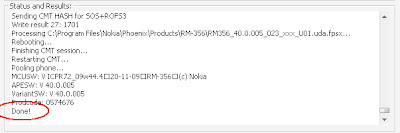
Ponsel akan restart dengan sendirinya dan muncul dengan versi baru yang sangat memukau!!
Pengoperasian Nokia 5800xm kamu akan lebih cepat, dengan beberapa aplikasi sudah tertanam di dalamnya. Pilihan Home Screen tambahan yang makin memudahkan pengoperasian.Untuk lebih menyempurnakan sistem pengoperasiannya yang baru, alangkah baiknya ponsel kamu jangan langsung di utak-atik. Biarkan software barunya beradaptasi dengan hardware.
Saya baru melakukan Flashing ini kemarin (18 April 10), dan berikut perubahan-perubahan performa pada Nokia 5800xm CFW V 50.0 :
Note :
Change Log 5800xm CFW V40.0
- Hasil flashing, untuk music player hanya membaca file mp3 di E:Music. Jadi kamu harus posisikan semua file mp3 di direktori tersebut pada MMC.
- Tidak ada pilihan mode full qwerty keyboard. Tapi jika ponsel di putar, secara otomatis akan berubah ke mode pengetikan full qwerty keyboard.
- X-plore error saat pertama dibuka, jangan khawatir. Tutup kembali Xplore dengan taskman, dan segera buka kembali Xplore. Masalah tidak ada lagi.
- Jangan menekan lama tombol switch off. Karena akan me-reboot ponsel, Untuk me-non aktifkan ponsel, cukup pilih opsi switch off. Patch untuk tombol switch off aktif.
- System error! Tidak perlu panik. Sebaiknya untuk patch c2z jangan kamu sett add to auto, itu adalah salah satu penyebabnya. Atau jika sudah terlanjur, kamu buka RP+ (RomPatcher) dan disable semua patch. Kemudian tutup RP+. Buka menu, kemudian buka RP+, dan apply kembali semua patch. Buka RP+ dengan Handy Taskman.
Tampilan baru setelah flashing
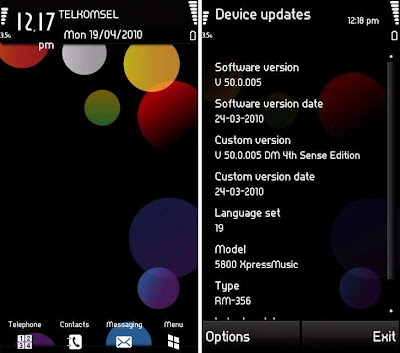
Selamat mencoba dan semoga berhasil!!
Best thanks to :
Symbianzone and Tube Lounge on Kaskus.
Go to link Download
Thursday, September 29, 2016
Cara Software Reset Epson Stylus T13 blinking
Cara Software Reset Epson Stylus T13 blinking
hal ini terjadi bila lampu printer epson t13 kedip-kedip merah atau biasa disebut blinking. Di status komputer menunjukkan untuk membawa printer Anda ke service center. Tapi hal ini sangat ribet kalau harus membawanya ke service center, belum lagi jarak antara rumah dan tempat service center yang jauh. Berikut ini ada cara reset epson t13 gratis alias free 100% tanpa harus membayar. Tapi kalau Anda mau berbaik hati atas info ini, Anda bisa klik iklan yang ada di Blog ini. :-)
Langsung saja, siapin secangkir kopi untuk menemani reset epson t13 ini. :-D
1. Langkah pertama tentunya printer epson T13 harus sudah terinstall drivernya.
2. Download software resetter Epson T13 dulu. Software bernama Resetter Epson T13, anda dapat download di sini Klik
3. Tanggal komputer tidak perlu dirubah seperti resetter sebelumnya.
4. PENTING !!! Matikan Antivirus anda, karena resetter T13 ini dideteksi sebagai virus oleh antivirus.
5. Ekstrak File Reseter dahulu, Jalankan program resetter Epson T13 dengan double klik di "AdjProg.exe".
6. Kemudian ikuti gambar berikut ini :

 |
| Add caption |
 |
| Add caption |
 |
| Add caption |

 |
| Add caption |
"Check : digunakan untuk cek counter yang maksimal 7800 point, anda dapat melihatnya di main pad counter. Kalau lebih atau mendekati 7800 point berarti printer perlu di reset"
"Initialization : digunakan untuk mereset atau mengenolkan kembali counter printer"
6. Setelah selesai matikan printer kemudian nyalakan lagi. Printer akan nyala dengan lampu berwarna hijau penuh. Berarti printer Epson Stylus T13 yang blink tadi sudah siap digunakan kembali.
Selamat mencoba............ Semoga Bermanfaat......
Saya sudah buktikan dan mencoba reset epson t13 ini berjalan 100% normal
Go to link Download
Subscribe to:
Posts (Atom)