Sunday, May 14, 2017
Cara mudah melindungi komputer dari virus
Cara mudah melindungi komputer dari virus
Cara ini adalah untuk mencegah virus merusak file system kita yang biasanya berakhiran EXE, dan Sebelum anda melakukan hal ini, anda harus terlebih dahulu membackup system windows anda (baca keterangan no 1 di atas), karena penulis takut anda melakukan kesalahan yang dapat berakibat fatal terhadap system anda. Anda juga harus mempunyai dasar Windows untuk melakukan ini, kalau tidak, anda akan bingung dan kesulitan untuk memahaminya.
Caranya cukup mudah, anda tinggal merubah attribut dari file EXE anda menjadi READ ONLY alias cuma bisa dibaca, tidak bisa ditulis. caranya bisa anda menggunakan SEARCH dari windows anda, kemudian cari semua program yang ber-ektenstion EXE (search key-nya *.exe) di folder windows. Setelah itu blok semua program yang tampil (atau tekan ctrl+a) terus klik kanan pilih properties. Setelah itu pilih READ-ONLY di bagian bawah kotak pilihan atributes. Bagi yang tahu DOS (command prompt) bisa menggunakan perintah ATTRIB, fungsinya sama saja dengan cara di atas. contoh: c:windows>attrib +r *.exe
Hal ini akan mencegah virus untuk merubah atau merusak file-file tersebut, karena pilihan tadi mematikan fitur untuk merubah file-file tersebut. Kalau anda ingin lebih yakin virus bisa mendeteksi hal tersebut, anda bisa tambahkan pilihan HIDDEN (menyembunyikan file tersebut) di sebelah kanan dari READ ONLY. Dengan kedua pilihan tersebut virus-virus pada umumnya tidak akan dapat menginfeksi file tersebut. Kalau anda ingin menampakan file HIDDEN ketika membuka folder di komputer anda, anda bisa pilih “show all hidden files” di “folder option”.
Anda juga bisa melakukan hal di atas ke semua folder komputer anda, kalau anda merasa hal ini perlu dilakukan, atau mungkin dilakukan juga ke file lain yang bukan ber-ekstensi EXE atau COM. Cara ini adalah cara yang paling efektif dan telah diuji coba oleh penulis. Satu hal yang penting diketahui, kalau anda ingin melakukan penghapusan atau perubahaan ataupun anda sering meng-update file yang ber-ekstensi EXE tersebut, anda harus ingat untuk membuka proteksi read-only atau hidden tersebut. Kalau tidak file tersebut tidak akan bisa dihapus atau diupdate, dan akan muncul pesan error.
Ini adalah salah satu cara untuk memproteksi file, cara lainnya dan cara Untuk mengetahui cara virus merusak/merubah file, membasmi atau menghapus virus secara manual.
Go to link Download

Tuesday, May 9, 2017
Cara Mudah Menghapus Virus Shortcut tanpa Anti Virus Edisi Cmd
Cara Mudah Menghapus Virus Shortcut tanpa Anti Virus Edisi Cmd
- USB Flash, dengan membuat file :
- autorun.inf
- Copy of Shortcut to (1).lnk
- Copy of Shortcut to (4).lnk
- Membuat file virus di folder RECYCLER dengan ekstensi .CPL dan EXE serta menginfeksi file aplikasi (EXE), DLL dan HTM/HTML.
- Mengeksploitasi celah keamanan Windows MS10-046 KB2286198 http://www.microsoft.com/technet/security/bulletin/ms10-046.mspx
- Internet, penyebaran Ramnit melalui internet dapat terjadi jika user mengakses file htm atau html dari webserver yang sudah diinjeksi oleh Ramnit.
- Jaringan (LAN/WAN) dengan cara menginjeksi file EXE/DLL/HTM/HTML pada folder/drive yang di share.
Berikut ini langkah langkah menghapus virus shortcut tanpa menggunakan aplikasi
- Pertama Pilih Run/Search
- Kemudian ketikkan cmd pada kotak Run

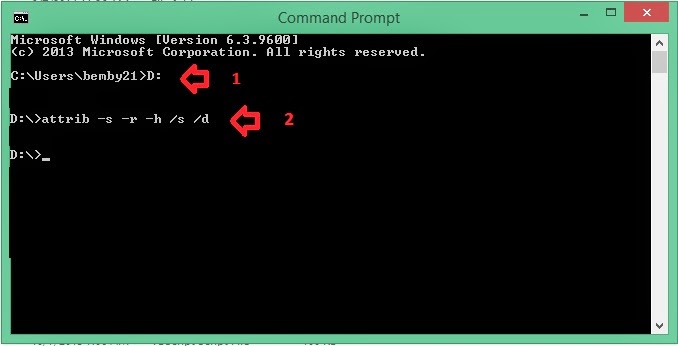
- Lalu masuk ke dalam drive flashdisk , kebetulan disini flashdisk berada dalam drive D, Cara masuknya dengan cara mengetik " D: " tanpa tanda kutip lalu tekan enter
- Lalu ketik perintah attrib -s -r -h /s /d lalu enter . Seperti gambar berikut ini
- Lalu bukalah flashdisk yang terinfeksi virus shortcut kemudian hapuslah file-file shortcut yang merupakan virus komputer.
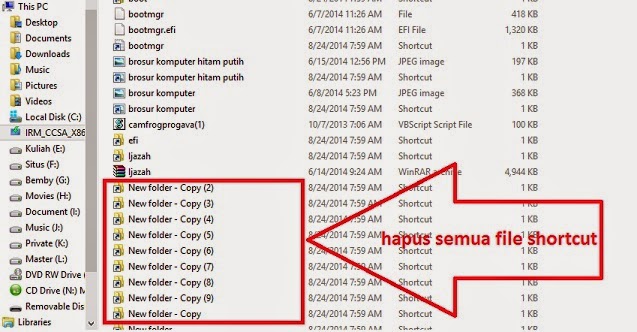
- Selamat mencoba, virus shortcut yang sering menyerang flashdisk bisa dihapus tanpa menggunakan antivirus, cukup menggunakan CMD

Go to link Download
Monday, May 1, 2017
Cara menyisipkan virus di komputer teman dengan software
Cara menyisipkan virus di komputer teman dengan software


- Sekarang, silahkan Download dan ekstrak Prorat pada link di bawah kemudian jalankan Prorat dari komputer anda.


- Berikut inilah tampilan Trojan Prorat. Pertama-tama, anda harus membuat sendiri trojan server yang nantinya akan dikirimkan dan dijalankan di komputer target. Anda diharuskan untuk membuat terlebih dahulu file trojan server. Untuk membuat trojan server, silahkan anda klik tombol Create kemudian klik Create Prorat Server (342 Kbyt).

- Maka akan muncul jendela Create Server seperti pada gambar berikut ini. Bagian pertama yang harus anda atur adalah bagian Notifications.
- Pada kotak IP (DNS) Address, silahkan masukkan alamat IP komputer anda. Sedangkan bagian lainnya boleh anda biarkan saja.

- Selanjutnya, klik General Setting. Server Port biarkan saja menggunakan default 5110. Kemudian buatlah Password Server dan Victim Name yang anda inginkan.

- Jika sudah, sekarang klik Bind With File. Pada bagian ini anda disuruh untuk menyisipkan file ke dalam trojan server. Berikan saja tanda ceklis pada Find server with a file kemudian klik Select File.

- Adapun ekstensi file yang bisa anda sisipkan terserah. Sebagai contoh saya menggunakan gambar ‘Koala.jpg’.

- Jika muncul kotak dialog peringatan, klik saja OK.
- Sekarang klik Server Extension. Silahkan pilih bentuk ekstensi trojan server yang anda inginkan. Penulis memilih menggunakan EXE.

- Pada bagian Server Icon, pilihlah icon sesuai keinginan yang telah disediakan. Sebagai contoh, penulis memilih menggunakan icon video.
- Oh ya, usahakan anda menggunakan bentuk icon yang menarik untuk di klik misalnya video, game, mp3, dan lainnya. Agar korban nantinya tertarik untuk membuka file tersebut.

- Selesai!! Untuk melihat file Trojan Server yang baru saja anda buat biasanya ada di dalam folder Trojan.
- Berikut inilah tampilan file Trojan Server yang baru saja dibuat menggunakan ikon video dan agar lebih menarik perhatian, maka penulis me-rename file tersebut dengan nama “Maria Ozawa Uncensored”. Tujuannya sih sederhana, agar siapapun yang melihat file ini nantinya jadi ‘kepengen’ untuk membukanya hehehehe


- Download Advanced Scanner
- Download Prorat ( Via 4hared )
Go to link Download
Sunday, February 12, 2017
Cara Mudah Mengatasi Virus Cryptolocker
Cara Mudah Mengatasi Virus Cryptolocker
Mungkin sobat pernah mendengar jenis virus komputer yang satu ini. Cukup berbahaya tapi tenang, disini kita akan kupas bagaimana virus ini bekerja dan bagaimana cara mengatasinya.
Ada satu malware yang bisa membuat sobat mendapatkan pengalaman dimintai tebusan dengan tawanannya data komputer sobat dienkripsi. Dan kabar buruknya, tidak ada orang di dunia ini yang bisa membantu mengembalikan data tersebut kecuali pembuat malware.
Menurut pantauan, korban malware Cryptolocker ini mencapai ribuan orang termasuk di Indonesia dan cukup banyak yang memilih membayar ransom dan mendapatkan kembali datanya. Namun ada juga kasus dimana ransom sudah dibayarkan tetapi data gagal di dekripsi.
Cryptolocker sudah menjalankan aksinya di Indonesia dan mendapatkan banyak laporan korban yang datanya dienkripsi oleh Cryptolocker.

Asal Penyebaran Virus Cryptolocker
Darimana Cryptolocker pertama kali masuk ke sistem komputer sobat? dan mengapa sobat bisa terinfeksi malware ini?. Jawabanya adalah sobat menerima sebuah email yang tidak dikenal, lalu membukanya dan didalam email tersebut terdapat sebuah lampiran yang berisikan malware Cryptolocker ini, contoh email yang berisikan trojan ini seperti gambar berikut :
- bad.exe
- Invoice-E_48F7B37FA8.pdf.exe
- Invoice-E_7B962B6199.zip
- STATEMNT-E_.pdf.exe
- STATEMNT-E_FF5039457304574230530914758303654534783458173204712- 37407658458674.pdf.exe
- 051dd6888c6c6611342965b7f11402f8.exe
- c-b4dba-1261-1389186301051dd6888c6c6611342965b7f11402f8.exe
- 051dd6888c6c6611342965b7f11402f8.PE_STATEMNT-E__pdf_exe . Dan nama acak lainnya.
Private key yang akan disimpan di server dan Public key akan dikirimkan ke komputer terinfeksi malware untuk digunakan mengenkrip semua dokumen di komputer tersebut. Satu-satunya kunci untuk membuka kembali data yang dienkripsi dengan Public key tadi adalah Private key pasangannya yang hanya diketahui oleh server pembuat key.


Ciri-Ciri Komputer Terinfeksi Virus Cryptolocker


Cara Pencegahan dan Pembersihan


Go to link Download
Wednesday, November 9, 2016
Computer virus in cats Part 1
Computer virus in cats Part 1
Computer virus in cats
RFID labels on the product, RFID chip in the animal, and now the first RFID virus. Moreover, the technique brought RFID eongan than a cat in the future.

Cattle are marked, dog and cat also put RFID chip. As the electronic sign, the chip will be overseeing the trip since the meat-cutting diternakkan home to animals. Pets that are found can be identified through a 15-digit code that is contained in the chip. However, the practical benefits of RFID is still in a high security risk.
To show the potential danger, the scientists at the Vrije Universiteit Amsterdam has chosen a cat as the object demo. Are you a cat infected with a computer virus, a research team leader Professor. Andrew Tanenbaum in a scientific publication. In any posts in the Computer Systems Group researchers show how RFID chip attacked a database.
An attack scenario is theoretically possible through such a cat is described Tanenbaum. A hacker insert a chip that has been manipulated into a cat. He brought a cat to the vet and identification system will show things that are not normal. Data is transferred to a central database. Some hours later the system to delete data on the RFID chip cat. Finally, strange things happen. ID display system and frozen display the message All your animals are owned by us.

Marked: The veterinarian, RFID chip that is injected into a small body of a cat.
Data-in RFID tags can not be trusted fully, said the team Tanenbaum warns. "During this time we think that only the data that will be falsified attack on RFID. However, hackers are also able to attack the database through SQL-injection or buffer-overflow, "said Tanenbaum. In the same way, malware, worms, and RFID viruses can spread.
Although security is not possible rift be on the chip, but on a database programmer, the RFID feel attacked. Asosiasinya, AIM, publish a direct response to the title Cats you safe. Basically, the team considered Tanenbaum has created a model system that has a weakness. According to AIM, RFID-tags used in the animal can not be rewritten.

Infected: In this kind of tags researchers in Amsterdam enter first RFID virus.
AIM may be correct because the Computer Systems Group in Amsterdam also does not discuss the more likely a cat as a virus. They create a scenario for the actual test in which RFID will be more of a role again in the future: They mensimulasi a computer supermarkets.
source : chip.co.id
Go to link Download
Sunday, October 16, 2016
Computer virus in cats Part 2
Computer virus in cats Part 2
How the virus to penetrate supermarkets
First, the attacker will buy a product with RFID tags, as usual. At home, he switch label electronic tags are empty and the device is free sold. When re-shuffle of the product to supermarkets, the cashier will scan the label that has been manipulated before. In tests, Tanenbaum write Quine, that is a program that reproduce the source-text to its own. The Attack is the target Oracle database.
 Noted: In Neuss, Metro tests RFID labels for supermarkets of the future.
 Still need a few more years before the cashier in supermarkets, read RFID tags. Store retail chain Metro Group to try new techniques for logistic goods and services customers. For them, only about 10 years time the price will be quite economical label to apply to every package. Currently, some containers and palettes have been using the code with the electronic chip that can be rewritten.
"We take very serious warning Tanenbaum," comments Harald Kelter from BSI (Bureau of Technical Information Security Germany) on a warning from Amsterdam. However, he did not want to call this as RFID virus. "Its a normal PC virus. We also did not mention toh virus floppy just because malwarenya stored on floppy disks. "Scenario-attack through SQL injection is basically not new. Cleft used long-known, only a new channel transfernya.
BSI a research titled Risks and the possibility of RFID application system revealed that the experts did not consider the security of the virus through RFID. The research discusses in detail the various types of attacks, but attacks the virus is not included.
"Danger is not think about when we make research 2 years ago," said Harald Kelter. He also saw lab experiment with a database without the full protection dikonstruksi. "For that, a simple label is not sufficient," said Kelter.
However, does not mean that such a theme with RFID malware is completed. In tests Tanenbaum, RFID tags-only functions as a virus. Goods in supermarkets also certainly not your cat infected with the virus.
Unknown risks: RFID on a debit card
On the other variants RFID encrypt the data and perform calculations directly on the chip, story can be more interesting, for example, the RFID functions as a dual-interface functions of the smartcard with a debit card, or to control access. "It is interesting to know whether the RFID chip of its own, not only database, it can be attacked or not," said Kelter.
 Full TAK: A security research BSI give a description of risks RFID, but it does not offend the virus.
 What happens if the RFID chip is encrypted with algorithms that have experienced inadequate by some car manufacturers a year ago. Portal road barrier they are based on RFID can be penetrated! Data on the transponder from Texas Instruments is protected with a key 40 Bit. To read this key, security experts only takes 15 minutes. Further manipulation becomes easier.
Go to link Download