Monday, June 12, 2017
Cara Reset Ink Waste Is Full Epson L110 L300 L350 L355
Cara Reset Ink Waste Is Full Epson L110 L300 L350 L355
Jika kita berbicara Tentang Cara Mereset Printer Khususnya Bagi Printer Epson L110,L300,L350,L355, ada dua jenis atau cara mereset, antara lain yaitu dengna menggunakan cara manual dan menggunakan Sotwere yang biasanya kita sebut dengan nama resetter. Kedua cara tersebut bisa kita terapkan pada Setiap Printer Epson. Pada tulisan terdahulu, saya telah membahas tentang cara Mereset Printer Dengan manual untuk lebih jelasnya anda bisa klik Cara Reset Ink Run Out Epson L110,L300,L350,L355. Tahap-tahap yang dikerjakan berbeda dengan cara mereset dengan menggunakan softwere, artinya, ada waktu-waktu tertentu kapan kita menggunakan resetter ini. Ink waste Is Full adalah salah satu indikasi atau tanda dimana kita harus mereset dengan bantuan Softwere resetter tadi.
Jadi saudara harus tahu, kapan anda menggunakan cara yang manual dan kapan kita harus menggunakan Softwere, sebenarnya jika anda melihat tulisan Ink waste Is Full itu berarti bahwa printer anda tidaklah rusak, dan bisa saya katakana baik-baik saja, pada dasarnya Tulisan ini adalah suatu tanda dimana Printer mendeteksi bahwa tempat Penampungan Pembuangan yang ada di dalam Printer, itu sudah penuh dan harus menggantinya dengan Yang baru.
“Mengapa Printer memberikan informasi seperti itu, padahal saya telah memasang selang pembuangan eksternal Pada Printer saya??” ,, Mungkin seperti itulah anda bertanya-tanya di dalam hati,, memang benar!! dan tidak mungkin tempat Pembuangan yang ada di dalam Printer menjadi penuh karena sudah disiapkan pada bagian luar printer, akan tetapi Meskipun anda telah memasang Pembuangan Eksternal, anda tetap akan menemukan Ink Waste Is Full pada Printer anda Mengapa?? Hal ini disebabkan karena Printer pada dasarnya tidak mendeteksi Full atau tidaknya Pembuangan yang pada pada Printer,, melainkan Printer hanya Menghitung berapa besar aktifitas Pencetakan yang pernah anda lakukan selama ini, dan sudah berapa besar tinta yang telah di buang atau di Cleaning oleh printer.
- Jadi Printer mengidentifikasi hal tersebut berdasarkan Pemakaian Bukan Berdasarkan Ful atau tidaknya Ink Waste Tersebut, Sudah Paham?? Bukan, Nah!!, Jika anda menemukan kondisi seperti yang saya jelaskan di atas, dalam hal ini adalah Ink Waste Is Full maka silahkan anda mengikuti beberapa tahap di bawah ini.Pertama-tama tentunya anda harus memiliki Softwere Resetter tersebut,, untuk mendapatkannya anda bisa ambil di sini. Resetter Epson L110,L300,L350,L355
- Setelah softwere berada di tangan anda, silahkan anda extract terlebih dahulu, kemudian buka foldernya, lalu jalankan aplikasinya dengan Double Clik PadaAdjprogcracked.exe.
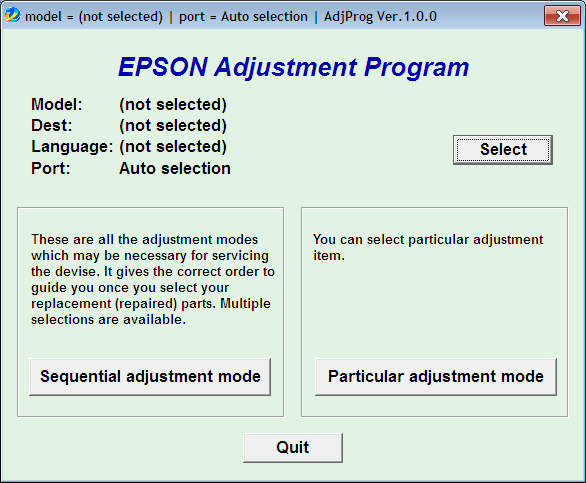
Aplikasi Aktif - Tahap selanjutnya Klik Select silahkan anda memilih Seri dari printer anda.
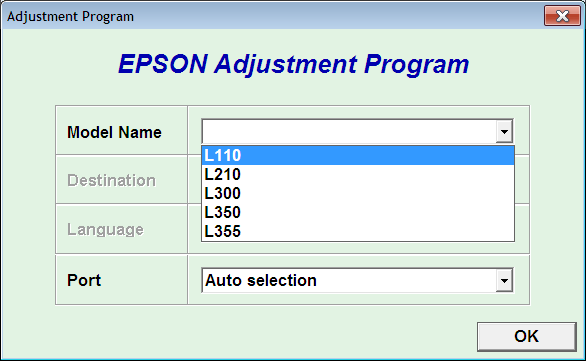
Pilih Seri Komputer Anda - Pilih pada bagian Particular Adjustment
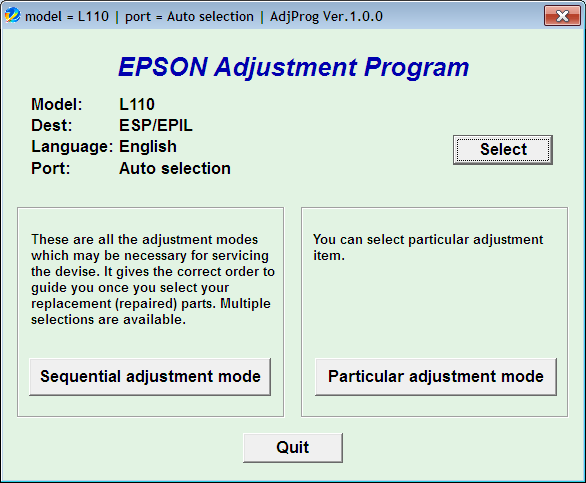
Klik Particular Adjusment Mode - Selanjutnya pilih pada Waste Ink Pad Counter. Lalu klik Ok
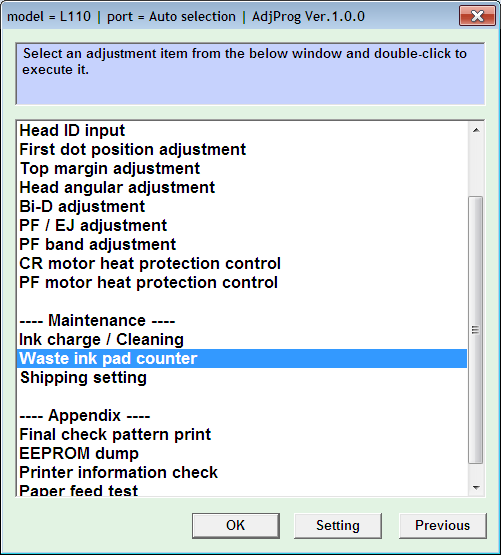
Pilih Waste Ink Pad Counter - Beri tanda Centang pada bagian Main Pad Counter. Klik Check - Initialization
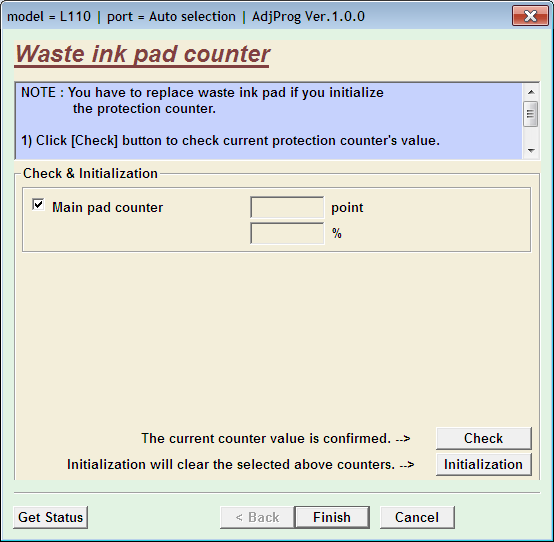
Beri tanda Centang, Lalu Check, Initialization - Klik Finish dan selesai
Go to link Download

Tuesday, June 6, 2017
Collection of Cool Google tricks 3 is the Best
Collection of Cool Google tricks 3 is the Best


Google is the Proclaimed king among all search engines present on the internet. Among all the web based search engines, Google stands out because of its high speed and simplicity.
Everyone is familiar with the web applications provided by Google. Some of these are the Gmail, Google Drive, Google app store and a lot more. But little do people know about some very handy Google tricks that come along with this impeccable search engine.
 Tags:- Tags
Top 10 Cool Google tricks of all times:
Below are Some Cool Google Tricks that i have Collected. Do not Forget to Check Bonus at the End of the Post. Enjoy !!!
1. Definition:
There is no longer the need to type a word and then visit dictionaries online to find its meaning. Using this trick, all you need to do is simply write “define” followed by the word whose meaning you want to know, This Cool Google tricks Come very handy if you use it Effectively.
You will be amazed to see that the meaning of the word, along with its synonym and antonym will be displayed on the search engine. For instance, type “define reach” and then press enter. The meaning of the word will get displayed on your screen.
2. Phone number lookup:
It is now possible to trace mobile number by simply typing the full number along with the area code. This will display the address as well as the name of the person under whose name the number is registered.(Doesn’t Work anymore)
This was the Most helpful thing i have seen from all the Google Tricks. Unfortunately its not working anymore. Check the below list.
3. Atari Breakout:
Only Few Know about this trick and so I think this is the Best Trick amongst all the Google Tricks. All you have to do is Type Images.google.com in the address bar of your browser to open up google images. Now type “Atari Breakout” and Press Enter.
You will Definately Be amazed to see what happens next. It is Only Fair to Add this Trick in my list of Cool Google Tricks.
Note: I am not Responsible if you waste over an hour in playing this game. J/K
4.Translate:
The “Google language tool” comes very handy while translating text, words, a fully fledged web page or document on the internet.
5.Find movies and weather:
All you need to do is type “movies” or “weather” in the search box followed by the area code or name of the state in order to display corresponding information regarding it. For instance, if you type “weather 12345”, weather conditions of the corresponding location will be displayed.
Also, on typing “movies 12345”, the details of all the movies currently running at that place along with number of shows will get displayed. this is another Cool Google trick then i like and use.
6.Paged linked to you:
You can now find the web pages and links that are connected with your blog or website. Simply type “link” followed by the URL of your website and you will get a list of all the pages connected with your website.
7.Tracking airline flights and packages:
This is another handy Google trick. You can now find the arrival time and status of a flight by simply entering the name of the airline and corresponding flight number.
8.Calculator:
You can use the Google search engine as a real time calculator as well. For instance, if you will type 25+25 in the search box, 50 will get displayed.
9.Stocks:
All you need to do is type the stock symbol on Google and you will get information about stock rates, links as well as charts. For instance, to know about the stock details of “Microsoft”, you have to write “msft” on Google.
10.Finding PDF results only:
To get results matching only a certain file type, simply type “fileType:” after your search. Online manuals can be found using this trick from Google.
11.Local search:(Bonus 1)
You can now find local restaurants and other landmarks with this trick. One of the best Google tricks according to me. Simply go to “Google visit” and type the name of the area and the place which you want to find. It is capable of displaying all local landmarks and places.
12. Use Google as Timer (Bonus 2)
You Can use Google Search to Set Timers too. If you want to Complete Certain Task in so and so minutes or hours then You can simply start Timer. This is one of the Most amazing Google Tricks that very few people are aware of. All you have to do is Open a new tab in your favourite Browser and Enter the Term “Set timer 10 minutes” and click enter.
As soon as you Hit enter you will see google timer is already started. In this Example i have used 10 minutes but you can always change it to anything.
For Eg: if you wish to set a Timer for 1 and half hour then you will enter thie term “Set Timer 90 Minutes” and Hit Enter.
With this it ends my list of Cool Google tricks, If i am Missing out on any Usefull Trick then please feel free to Comment.
Go to link Download
Monday, May 29, 2017
Christmas 2013 is Coming!
Christmas 2013 is Coming!
Go to link Download
Friday, November 4, 2016
Cara Mudah Reset Ink Waste Is Full Epson L110 L300 L350 L355
Cara Mudah Reset Ink Waste Is Full Epson L110 L300 L350 L355
Dan pada kesempatan kali ini yang akan kita bahas adalah bagaimana cara mereset dengan menggunakan software pada Epson L110, L300, L350 serta L355. Sahabat kapan sih kita diminta untuk menggunakan software untuk mereset? yaitu ketika anda melihat tulisa "Ink Waste is Full".

- Pertama download dulu Softwarenya Disini
- Kemudian silahkan Extract terlebih dahulu, kemudian buka foldernya, lalu jalankan aplikasinya dengan men Double klik pada Adjprogcraked.exe. dan akan tampil seperti gambar dibawah ini.
- Klik "Select"
- Pada Model Name "Pilih seri printer yang akan kita reset" lalu klik Ok.
- Klik "Particular Adjustment mode"
- Pilih atau sorot "Waste Ink Pad Counter" lalu klik OK.
- Klik "check" dilanjutkan Klik "Initialization" lalu centang "main pad counter"
- Beri tanda Centang pada bagian Main Pad Counter. Klik Check - Initialization.
- Dan terakhir Klik Finish dan selesai.
Go to link Download
Monday, October 10, 2016
Cisco is Opening Their H 264 Codec for Free
Cisco is Opening Their H 264 Codec for Free
Cisco has just announced that they will release their H.264 codec for public and it will be open-sourced so that it will boost WebRTC deployment in many other products, such as Firefox who have also responded by making an announcement that they will support it as soon as possible.
Cisco will release a binary module that can be downloaded for free from the Internet and this enables any open source project to incorporate Cisco’s H.264 module without paying MEPG LA license fees. This will surely boster WebRTC implementation in Firefox and hopefully Google Chrome will follow soon enough.
I love it when big organization realize that by opening technology will surely give them more benefits instead of disadvantages.
Go Open Source ......
Go to link Download