Showing posts with label v. Show all posts
Showing posts with label v. Show all posts
Monday, April 24, 2017
Console v PC The Video Game Smackdown!
Console v PC The Video Game Smackdown!
Do you get your game on via PC or console? Which is better? Which has better performance? This has long been argued by many gamers from different backgrounds. This Tech Tip will attempt to address both sides and determine which one is the best of the best!
Consoles
 Today, gaming on a console brings many of us older gamers back to our roots. People (myself included) who grew up with the good ‘ol 8-bit Nintendo Entertainment System, Sega Genesis and Atari 2600 will remember the simplicity and endless hours of fun with those gaming machines. Speaking of simplicity, this is a console’s greatest strength when it comes to its function. No fussy installations, hardware configurations and possible incompatibilities are involved. You just plug the cables into your television, plug the console’s power adapter in, insert the game and voila! Instant fun right in your living room.
Another blessing of console systems is the pricing. As of this writing, a Sony Playstation 3 runs for about $300, a Microsoft Xbox 360 systems and the Nintendo Wii start at $199 which is relatively cheaper than a gaming computer. In addition, the Nintendo 3DS and Sony PSP provide a way to take the console fun on the go. Console gaming offers instant action at a relatively affordable price.
PC Gaming
 At the other corner, we have the classic pc computer platform which many would argue has just as good, if not better benefits as its console counterparts. First, a computer can do everything a console can do but can also be used to check email, download music, write papers, do research, conduct business, and edit photos and much more. Hence, its utility is plenty for a consumer. Second, with the rapid spread of technology, a computer can be continuously upgraded with new hardware to accommodate new technologies and new games that take advantage of next-generation graphical eye candy (ahem, DirectX 11).
  In, addition, PC gamers have the option to overclock their computers in order to squeeze extra power from their systems; some also overclock and refrain from buying newer and more expensive hardware until prices come down in their favor. Regardless, the PC platform offers a wide range of utility and flexibility for the gamer.
Why Console over PC
Let’s face it, if you’re hosting a party, it would certainly increase your nerd stock to set up 4-5 computers in your living room for a fun and casual gaming atmosphere. Let’s not forget that most average people either don’t know or aren’t comfortable using a computer keyboard and mouse to play a video game. In addition, you have the Microsoft Kinect and Nintendo Wii systems that add a new level of interaction between the users and the gaming system. Thus, the console platform has something for everyone.
 You also have the simplicity of a standard gaming platform. For example, the Microsoft Xbox 360 has the same setup and the same type of games as it did when it debuted in 2005. Therefore, there are no headaches and issues about compatibility on games and accessories.
Regarding games, the consoles excel at several genres which include (but not limited to) sports games, educational games and racing games. Even though Madden 2011 is available for PC, most sports fans would rather play it on an Xbox 360/PS3 because of the easier gamepad. Other games like Guitar Hero and Gran Turismo 5 would arguably be preferred on console systems. Furthermore, fighting games like Marvel vs. Capcom 3 and Mortal Kombat vs. DC Universe are more socially preferred as everyone is usually huddled around a big-screen television.
Why PC over Console
 What do the Xbox 360, Playstation 3 and Nintendo Wii all have in common? If you crack open their cases, you’ll find a CPU, video card, sound card, hard drive, RAM, network adapter, optical drive and motherboard. Whoa? That’s the exact same thing one would find inside a computer. From a technical perspective, it is true that all consoles are computers since they share the same hardware. However, the biggest issue with consoles is their obsolescence. The hardware inside the Xbox 360 is from 2005 and the hardware inside the Sony PS3 is from 2007. Graphically, their performance is subpar relative to a current-generation gaming PC with 2010-11 hardware. For example, Activision’s newly-released game, Call of Duty Black Ops was a cross-platform release. In other words, it came out for PC, Xbox 360, Wii, PS3 and Nintendo DS all together. However, if you examine the PC hardware requirements for the game, you’ll notice it requires Direct X 9. This graphics platform was released in 2002-2003; Meaning that the game was graphically “dumbed down” so the console platforms could support it. Also, PC gamers have the flexibility of graphically tweaking the game settings for optimal visual performance. For example, if you look closely at a television running Halo 3, you’ll see lots of “jaggies” or lines/edges with jagged textures which is a painful eyesore among PC gamers.
 Console gamers also mock that PC gamers are uber-nerdy when they all get together and have LAN parties. That is, several PC gamers bring over their computers and set up a local area network (LAN) at someone’s home and play video games. So what do you call 8 people split between 2 connected Xbox 360s and 2 big-screen TVs playing Halo 3? It’s really the same thing except PC gamers each have their own monitors and don’t have to squint at a corner of the TV.
So Which is Better?
Ultimately, it really comes down to preference. Neither PC nor console is superior but rather the choice comes down to what the gamer prefers. Are you the type of person who just wants to jump in, not worry about settings and wants to just enjoy the action? Or do you like playing in the living room in front of a big-screen TV with a simple gamepad?
Are you the type of person who enjoys long-hours of the MMORPG genre such as World of Warcraft? Do you fancy opening up your computer case and enjoy tinkering with BIOS settings, replacing parts and think FPS (first-person shooter) games are meant to be played via keyboard and mouse?

Regardless of your preference, just keep in mind several factors. First, know how much you want (and can afford) to spend before making a significant financial investment. Second, make sure the gaming platform you choose is aligned with your gaming interests and preference. Third, since technology moves so rapidly, keep the future in mind and consider changes/trends that might affect your future gaming purchases.
Remember, if you’re having trouble getting past a certain level, throw it into God mode and game on!
Go to link Download

Tuesday, February 28, 2017
Cara Mudah Rotasi Video yang Terbalik menggunakan Software VIDEO ROTATOR V 1 0 9
Cara Mudah Rotasi Video yang Terbalik menggunakan Software VIDEO ROTATOR V 1 0 9
VIDEO ROTATOR_V.1.0.9
Include KEY REGISTRATION

Assalamualaikum...wr...wb. Hai Sobat RD yang berbahagia, pernahkah Sobat me-rekam video dari hp terus pas diputar di PC atau Laptop videonya miring atau malah terbalik, pasti sangat menjengkelkan banget kan...??. Nah, itulah yang pernah saya alami.
Sebelum masuk pada inti postingan, saya ingin bercerita sedikit tentang pengalaman saya yang tentunya sangat berkaitan dengan isi dari postingan kali ini. Ceritanya pada tanggal 26-28 Desember 2014 kemarin saya beserta keluarga pergi liburan atau refreshing ke daerah Cisarua-Bogor, sudah pasti pada moment-moment seperti itu siapa pun ingin mengabadikannya untuk dijadikan dokumentasi keluarga dan menjadi Arsip keluarga baik dalam bentuk foto atau pun Video. Begitu pun saya, walaupun hanya berbekal sebuah Handphone saya ingin mengabadikan moment liburan bersama keluarga dengan memfoto dan merekam video untuk dijadikan dokumentasi keluarga.
Setelah acara refreshingnya selesai dan back to home, file hasil foto dan video dari Handphone pun saya pindahkan ke Lepi (laptop), yang pertama saya lihat adalah file gambar/foto dan semuanya terlihat bagus dan normal-normal saja karena walaupun ada foto yang miring atau terbalik sangat mudah merotasinya dan ngga masalah, permasalahan muncul ketika saya memutar file video, ternyata ada satu video yang ketika diputar dilaptop gambarnya terbalik, seperti gambar di bawah ini:
Klik gambar = Zoom

Nah, ribetkan nontonnya... he...he..., kalo nonton di HP sih nggak masalah tinggal putar HPnya...beres, kalo di lepi...? masa iya lepinya diputar ha...ha...ha..., setelah berselancar dan mencari solusi di mbah Google akhirnya ketemulah software untuk merotasi video terbalik dengan mudah yaitu Video Rotator_v.1.0.9.
Dengan menggunakan software Video Rotator_v.1.0.9 ini, video Saya berhasil dirotasi dan sudah tidak terbalik lagi, ini dia gambar video yang sudah dirotasi:
Klik gambar = Zoom

Para Sobat yang mungkin mengalami hal seperti saya, atau mempunyai video yang terbalik dan sudah mencoba software lain untuk merotasi video tersebut namun gagal dirotasi, tidak ada salahnya mencoba software Video Rotator_v.1.0.9 ini karena sangat mudah digunakan dan dijamin tidak akan gagal dalam hal rotasi video.
Untuk mendapatkan software Video Rotator ini Sobat bisa mengunjungi situs resminya pada alamat ini http://www.videorotator.com/, atau Sobat bisa mengunduhnya pada link download di bawah dan jangan lupa untuk melakukan registrasi dengan cara memasukkan Key Registration yang telah tersedia agar softwarenya menjadi full version.
Berikut ini Screenshot Video Rotator_v.1.0.9:


Beberapa kelebihan dari Video Rotator_v.1.0.9 ini adalah pada Output Format yaitu hasil dari file video yang dirotasi bisa disimpan ke dalam format:
*MP4 (High Quality MPEG4 Video)
*MPG (MPEG Video)
*AVI (Windows Standard Video)
*MOV (Apple/Quick Time Video)
*FLV (Flash Video)
Untuk Rotasi (Rotate) ada 4 pilihan yaitu:
*90 Degree Clockwise
*90 Degree Anticlockwise
*Horizontal Mirror
*Flip Upside-down
*None (hanya untuk mengkonvert format video dan tidak merotasi).
Link Download:
Single link; Size 7.33 MB
Klik gambar download di bawah ini untuk mengunduh file:

Key Registration: VR7513914WD
_________________________________________________________________
Sekian dulu postingan saya kali ini, semoga bermanfaat dan berkenan di hati sobat semua apabila ada yang ingin disampaikan silahkan berkomentar pada kolom komentar di bawah.
Terima kasih telah berkunjung di blog sederhana ini, silahkan berkunjung Kembali dikesempatan yang lain.
Selanjutnya Sobat juga bisa melihat postingan menarik lainnya yaitu Aplikasi Pengingat Waktu Sholat Shollu atau klik Daftar Isi Di Sini untuk melihat halaman lebih luas.
Oh iya, hari ini kita berada di penghujung Tahun 2014, karena dalam hitungan jam ke depan tepatnya jam 12 malam nanti akan terjadi pergantian Tahun yaitu Tahun 2014 akan segera berakhir dan akan beranjak ke Tahun 2015.
Sebelum mengakhiri postingan kali ini, saya ingin mengucapkan SELAMAT TAHUN BARU 2015, semoga di Tahun 2015 nanti akan lebih baik lagi dari Tahun yang lalu...amien.
Wassalamualaikum...wr...wb.
Go to link Download
Saturday, December 31, 2016
Cara Mudah Crack IDM v 6 11b Manual Version
Cara Mudah Crack IDM v 6 11b Manual Version
IDM (Internet Download Manager) merupakan aplikasi downloader yang cukup handal dalam hal download tentunya, mungkin rekan-rekan semua dah mengetahuinya ataupun sudah menggunakannya. IDM bisa kita temukan dengan gampang terutama ketika kita bertanya sama mbah Google pasti langsung dikasi dari versi jaman purba sampai jaman modern... ^_^
Saat ini saya bukan mau ngebahas mengenai aplikasi ini, akan tetapi yang akan saya bahas adalah tips dan trik cara manual membuat aplikasi ini menjadi fullversion tanpa menggunakan Patch/crack yang bertebaran dimana-mana. Cara ini dah ane buktikan langsung menggunakan IDM versi 6.11b (update terbaru klo ga salah) menggunakan OS Vista 32bit, Win XP Prof n Win Media Center SP2, seandainya rekan menggunakan Win7 cara ini tidak akan bisa (kebetulan kurang tau kenapa ga bisa, tapi coba aja sapa tau bisa klo sama sobat semua ..he).
Oke deh mari kita mulai.
Langkah 1.
Siapkan makanan ringan beserta minumannya, jangan lupa pesen Nasi Goreng buat ane... :D
Install terlebih dahulu IDM terbaru V.6.11b, bagi yang belum punya silahkan unduh dulu disini atau dimana aja..
Seandainya rekan-rekan sudah menginstalnya dengan versi lama silahkan update ke versi terbaru --> buka IDM klik menu Help kemudian update, dan jika rekan sudah mempunyai file installernya yang baru langsung aja di instal untuk meng upgrade versi sebelumnya tidak perlu uninstall versi sebelumnya jangan lupa exit terlebih dahulu IDM yang sudah terpasang biasanya ada di Systray.
Cara installnya ga perlu saya jelaskan lagi ya karena saya yakin 666% sobat semua dah pada mahir.. Yo lanjut.
Langkah 2.
Setelah proses instal selesai, akan muncul seperti gambar dibawah

Gambar 1
Klik tombol Ok, maka akan muncul seperti gambar dibawah.

Kemudian kita coba isi semua kotak kosongnya mulai dari First Name, Last Name dan Email (bebas terserah sobat) lalu masukan salah satu SN dibawah, ingat klo kita asal masukin SN maka pas kita klik tombol OK akan muncul seperti ini :

Copas salah satu SN ini ke kotak Serial Number di menu registrasi IDM tadi, Kemudian klik tombol OK
RLDGN-OV9WU-5W589-6VZH1
HUDWE-UO689-6D27B-YM28M
UK3DV-E0MNW-MLQYX-GENA1
398ND-QNAGY-CMMZU-ZPI39
GZLJY-X50S3-0S20D-NFRF9
W3J5U-8U66N-D0B9M-54SLM
EC0Q6-QN7UH-5S3JB-YZMEK
UVQW0-X54FE-QW35Q-SNZF5
FJJTJ-J0FLF-QCVBK-A287M
Setelah selesai tunggu beberapa saat maka akan muncul kembali peringatan seperti Gambar 1. (hiraukan saja kita klik tombol OK.... jangan bosen ya pijit tombol OK, ^_^)
Langkah 3.
Buka Windows Explorer atau Tekan tombol Win+E., setelah muncul Win Explorer
Klik C: --> windows --> system32 --> driver --> etc --> hosts (lihat gambar dibawah)

Kemudian cari file hosts.ics, jika sudah ketemu open with ke notepad file hosts tersebut maka akan nampak seperti berikut.

Copas teks di bawah semuanya ke file hosts yang sudah dibuka tadi, lebih tepatnya copas dibagian bawah (lihat gambar dibawah yang ditandai kotak merah)
127.0.0.1 tonec.com
127.0.0.1 www.tonec.com
127.0.0.1 registeridm.com
127.0.0.1 www.registeridm.com
127.0.0.1 secure.registeridm.com
127.0.0.1 internetdownloadmanager.com
127.0.0.1 www.internetdownloadmanager.com
127.0.0.1 secure.internetdownloadmanager.com
127.0.0.1 mirror.internetdownloadmanager.com

Langkah 4.
Jalankan kembali aplikasi IDM nya.... jreng...... eit blm beres sob.yo minum dulu.....
Setelah di jalankan akan muncul seperti Gambar 1 untuk terakhir kalinya, ikuti aja seperti Langkah ke 2 diatas dengan mengisi kotak kosong mulai dari Nama, email dan serial number ke kotak kosong lalu klik tombol OK jika sudah.
Sekarang baru deh selesai, coba cek jalankan kembali IDM nya.. jika benar ngikutin langkah-langkahnya maka IDM sobat akan menjadi full, cek di menu registration, nama registrationnya akan disable. Kemudian cek di menu Help pilih About IDM akan teregistrasi dengan nama yang kita masukin tadi. Liat contoh dibawah.

Mudah-mudahan aja cara ini bisa terpakai sampai update IDM terbaru muncul lagi jadi sobat semua ga usah khawatir lagi nyari cracknya... :D
Sekian dulu dari ane wassalam...
sumber : http://black2share.blogspot.com/2012/04/cara-mudah-crack-idm-v611b-manual.html
Go to link Download
Wednesday, November 16, 2016
Cara Mudah Membuat QR Code Untuk Link Text BBM V Card GPS di PC
Cara Mudah Membuat QR Code Untuk Link Text BBM V Card GPS di PC
 Cara Mudah Membuat Quick Response (QR) Code Untuk Link, Text, BBM, V-Card, GPS, Phone Contact, dll di PC.
Selamat datang di Yusuf Dektop! kali ini saya akan membagikan sebuah tutorial tentang Cara Mudah Membuat Quick Response (QR) Code menggunakan Software PC.Quick Response Code atau sering juga disebut dengan QR Code yang berfungsi seperti Barcode biasa digunakan untuk menyimpan sebuah code ataupun identitas seseorang. Kode ini bisa sobat scan untuk melihat isinya dengan menggunakan QR Scanner di gadget sobat!. Mungkin beberapa orang terutama pengguna BlackBerry Mesengger mungkin tidak asing lagi dengan kode-kode seperti ini, namun gimana ya cara membuatnya melalui Komputer?? Untuk mendapat jawabannya silahkan simak tutorial berikut ini.
Cara untuk membuatnya sebenarnya mudah, yaitu dengan mengkonversi beberapa kode menggunakan software kecil bernama QR-Code Generator. Dengan QR-Code Generator ini sobat bisa membuat:
- Text Biasa
- URL
- SMS
- Phone
- Contact
- Wi-Fi
- Geo Tag
- BBM
Kurang lengkap apa coba? Screenshotnya seperti gambar berikut:
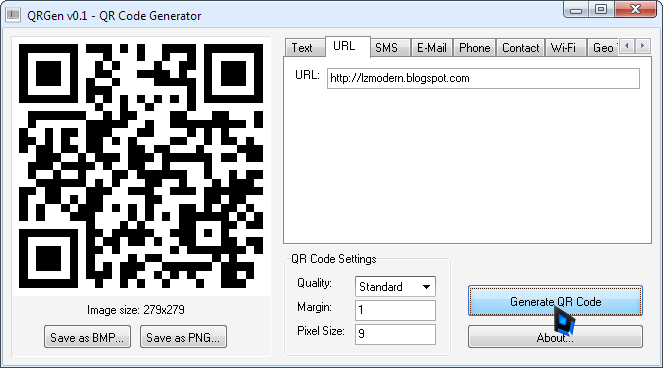
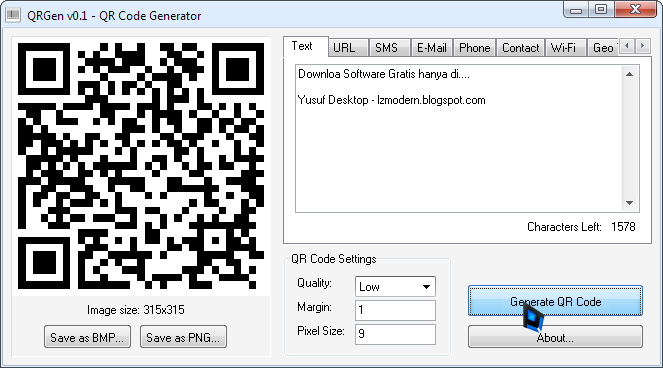
Selain itu software ini 100% Offline dan tentunya Gratis!
Cara Menggunakan:
- Pilih code apa yang ingin sobat jadikan QR dengan memilih salah satu tab yang ada.
- Tuliskan konten yang ada didalamnya.
- Lalu klik "Generate QR Code"
- Bila belum sesuai, sobat bisa juga mengatur kualitas dan jarak marginnya.
- Lalu simpan dengan menekan tombol Save as BMP atau PNG
Download Link:
Download QR Code Generator v1 (290KB)
Download QR Code Scanner
Go to link Download
Subscribe to:
Posts (Atom)